Skip to content

Product guide

Every screen, explained.

The whole system, screen by screen — 41 screenshots across 9 areas, captured from the live product. What each module does, and the engineering underneath it.

Every screenshot below is the real product UI — captured from a live CareIT HMS instance seeded with realistic sample data. No mockups, no concepts; names and figures are sample data, never real patients.

Watch it, read it, keep it

The same guide, three ways.

Watch the narrated walkthrough, scroll the screens below, or take the illustrated PDF with you.

Video user guide — every module, narrated 10:46 · narrated · 1080p

CareIT HMS User Guide — PDF edition

51 pages, A4 · every module illustrated with the real UI, step by step · 11 MB

Download the PDF

01 · Overview

Overview

Where every shift starts: a role-aware home and a notification stream that carries pointers, never PHI.

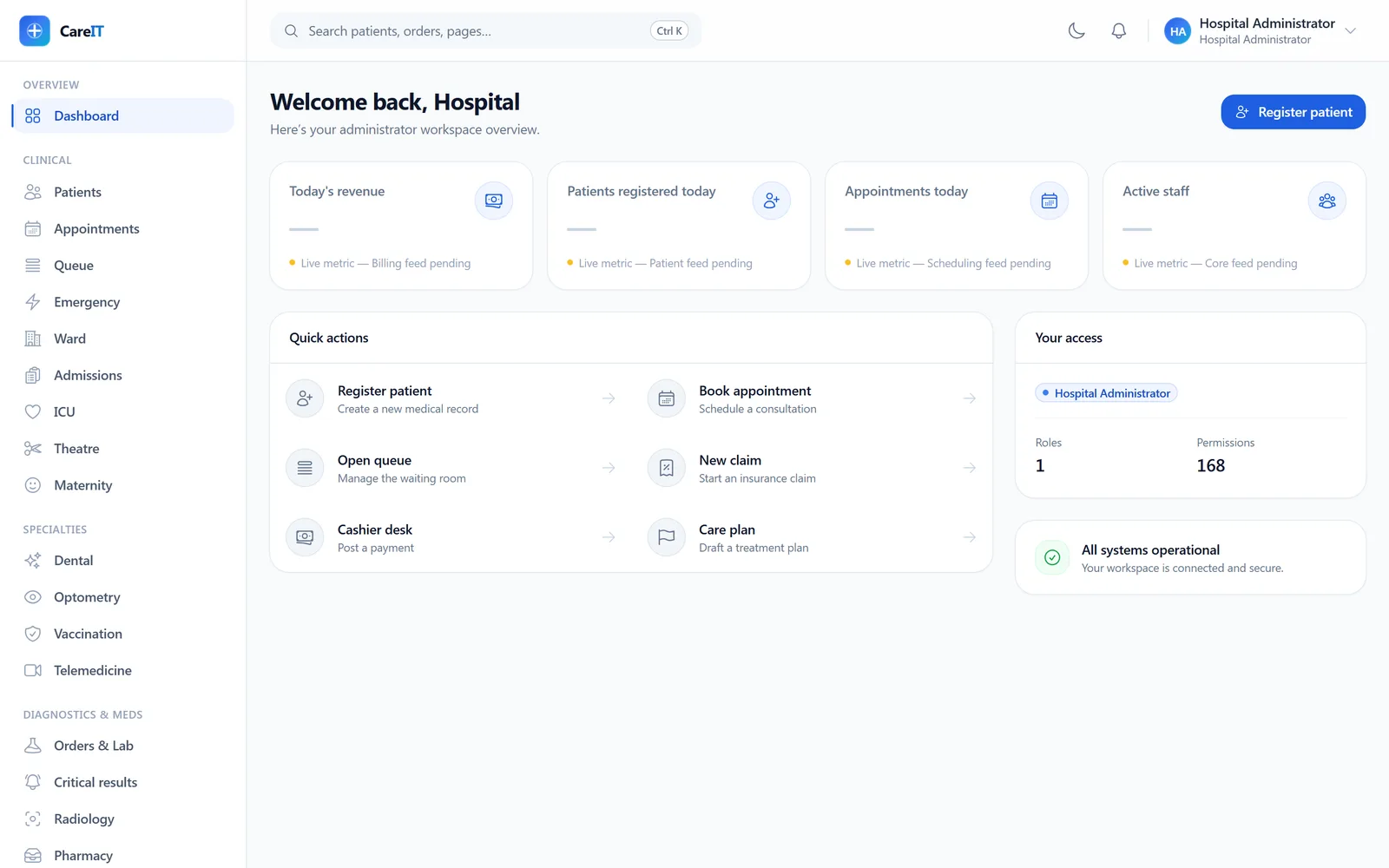
CareIT HMS dashboard with quick actions, access summary, and live-metric cards

Dashboard

/dashboard

The landing screen for every role. Quick actions jump straight into the flows your permissions allow; the access panel shows exactly which roles and permissions you hold.

  • Permission-gated quick actions — register, book, queue, claim, cashier, care plan
  • Live-metric cards wired to real feeds (shown honestly as pending until data flows)
  • Your-access summary: roles and permission count at a glance
  • System status strip confirming the workspace is connected
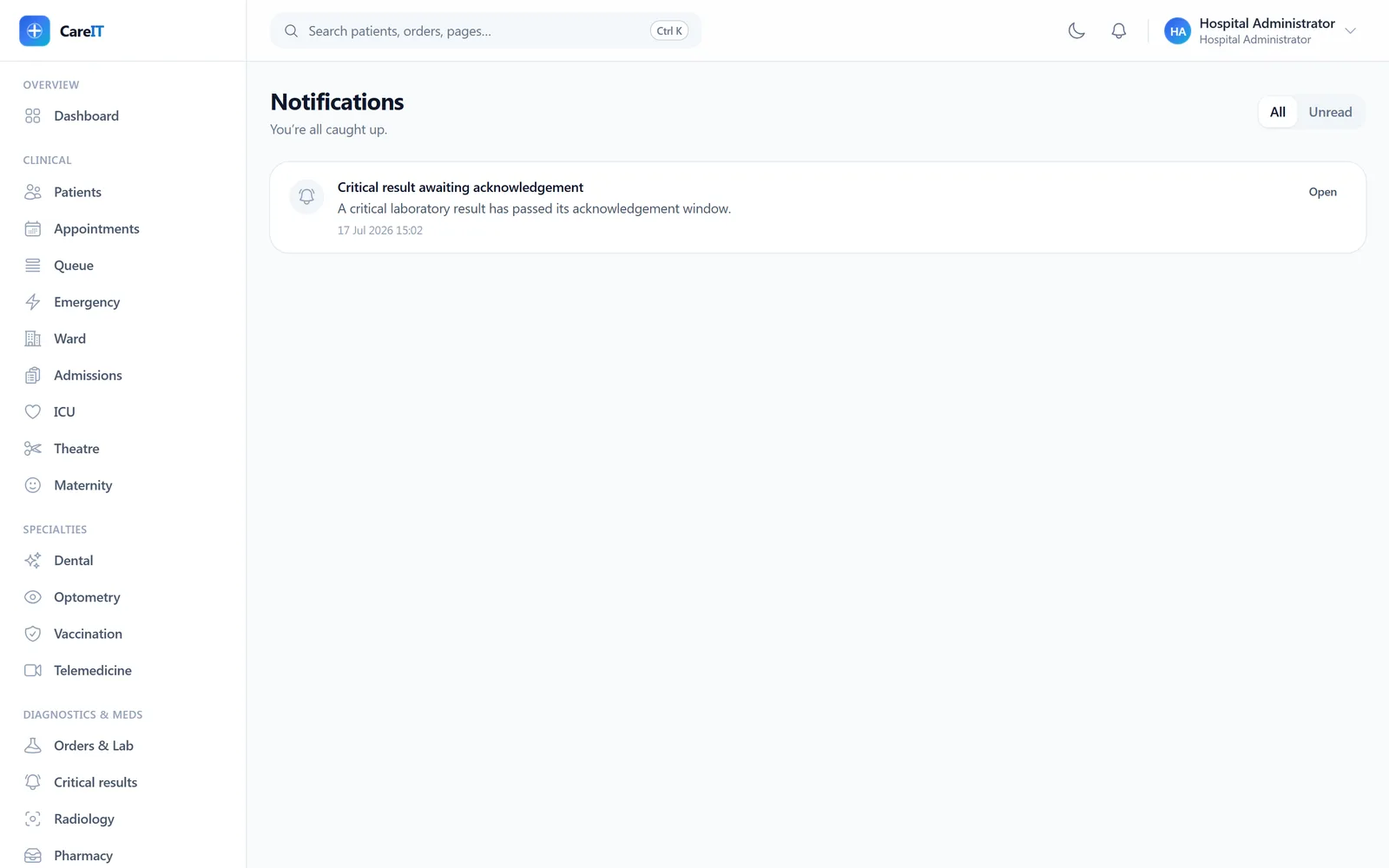
Notification inbox showing a critical-result acknowledgement notice

Notifications

/notifications

The in-app notification inbox behind the header bell. Critical results, critical findings, and published rosters land here for everyone with authority to act.

  • PHI-free by design — titles and references only, never clinical content
  • Unread badge on the header bell with mark-read and mark-all
  • Each notification deep-links to the screen where you act on it

02 · Front desk & scheduling

Front desk & scheduling

The flows that set the tone for the whole visit: finding the right chart, booking, and an honest queue.

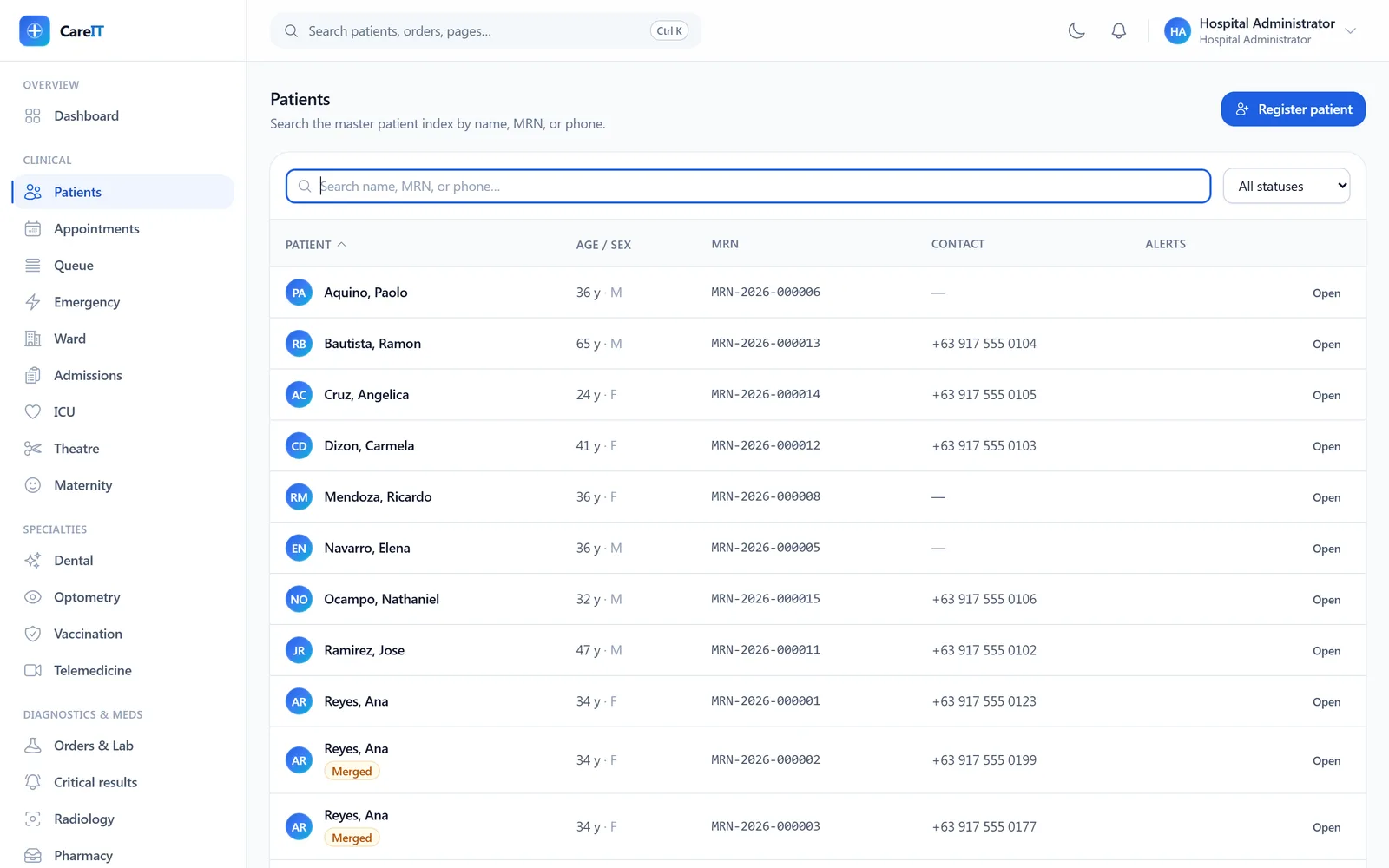
Master patient index with search, MRNs, and a merged-record badge

Patients (MPI)

/patients

The master patient index. Debounced search by name, MRN, or phone; keyboard-first (press / to search); merged duplicates stay visible with a badge so history is never hidden.

  • Search by name, MRN, or phone with server-side pagination
  • MRNs issued from a dedicated number series
  • Merged records remain listed and badged — the audit trail survives
  • Alerts column surfaces active allergy flags
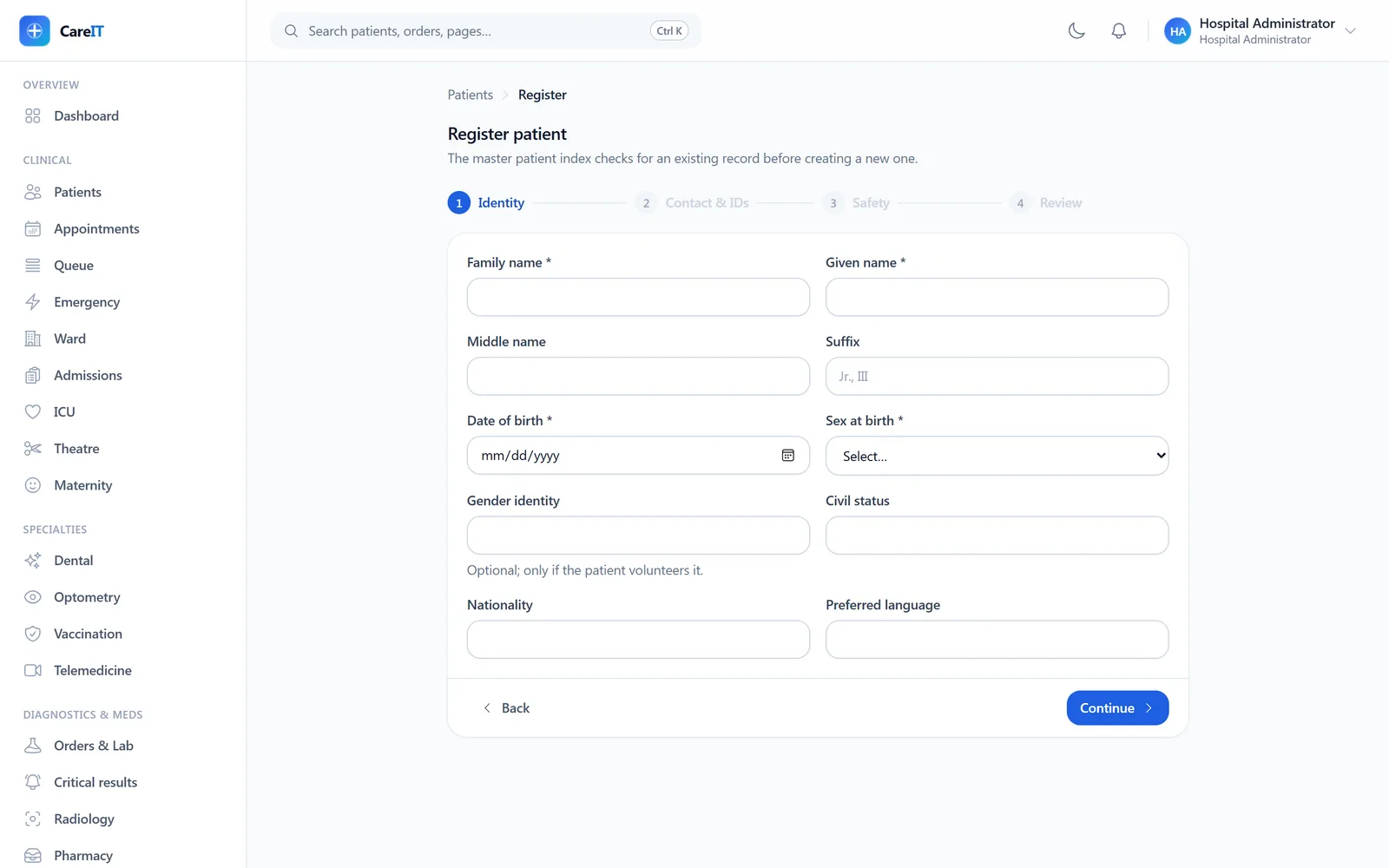
Four-step patient registration wizard on the identity step

Patient registration

/patients/register

A four-step wizard — identity, contact, identifiers, review. Before anything is saved, the MPI checks for likely duplicates and makes you resolve them, so duplicate charts are caught at the door.

  • Duplicate detection with a resolution dialog before create
  • Government IDs and other identifiers encrypted at rest with blind indexes
  • Civil status, nationality, and preferred language captured up front
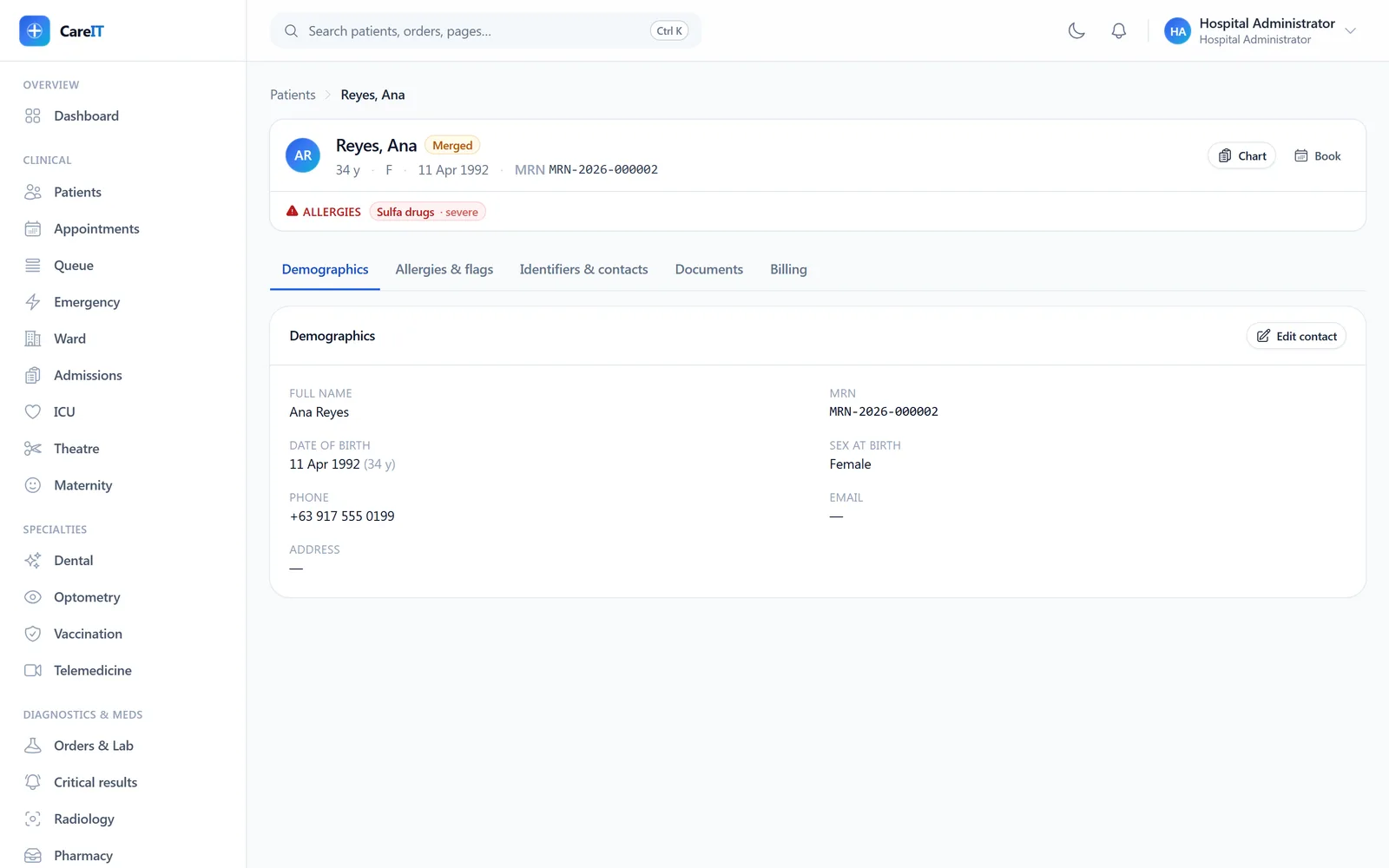
Patient chart with identity banner and demographic, allergy, encounter, document, and billing tabs

Patient chart

/patients/{patient}

One patient, one page. The identity banner — name, age, MRN, active allergies — is the same banner pinned to every clinical screen. Tabs cover demographics, allergies, encounters, documents, and billing.

  • Demographics with inline contact editing
  • Allergies & flags tab feeding the banner everywhere
  • Documents tab: uploads stored under server names, checksummed, downloads audited
  • Billing tab shows charges captured against this patient
  • Merge workflow with side-by-side diff and second-person approval
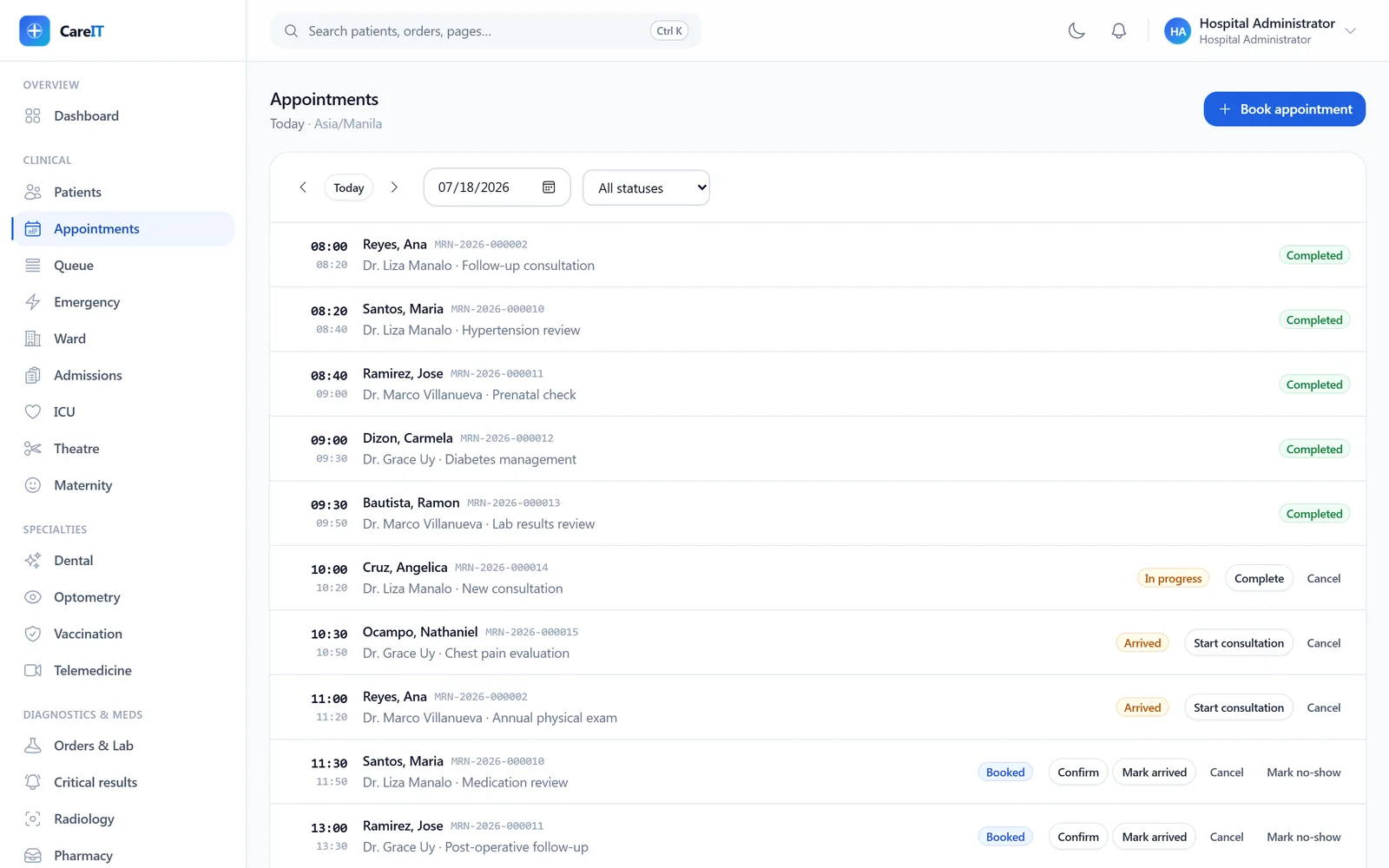
Appointment board for a full clinic day with statuses and actions per row

Appointments

/appointments

The clinic day at a glance, always in the facility’s own timezone. Each row advertises exactly the actions its state allows — confirm, mark arrived, start consultation, complete, cancel, no-show.

  • Day navigation with date picker and status filter
  • Booking checks practitioner schedules and holds the slot
  • State machine is server-owned — the UI can never offer an illegal transition
  • Walk-ins and booked patients merge into one operational picture
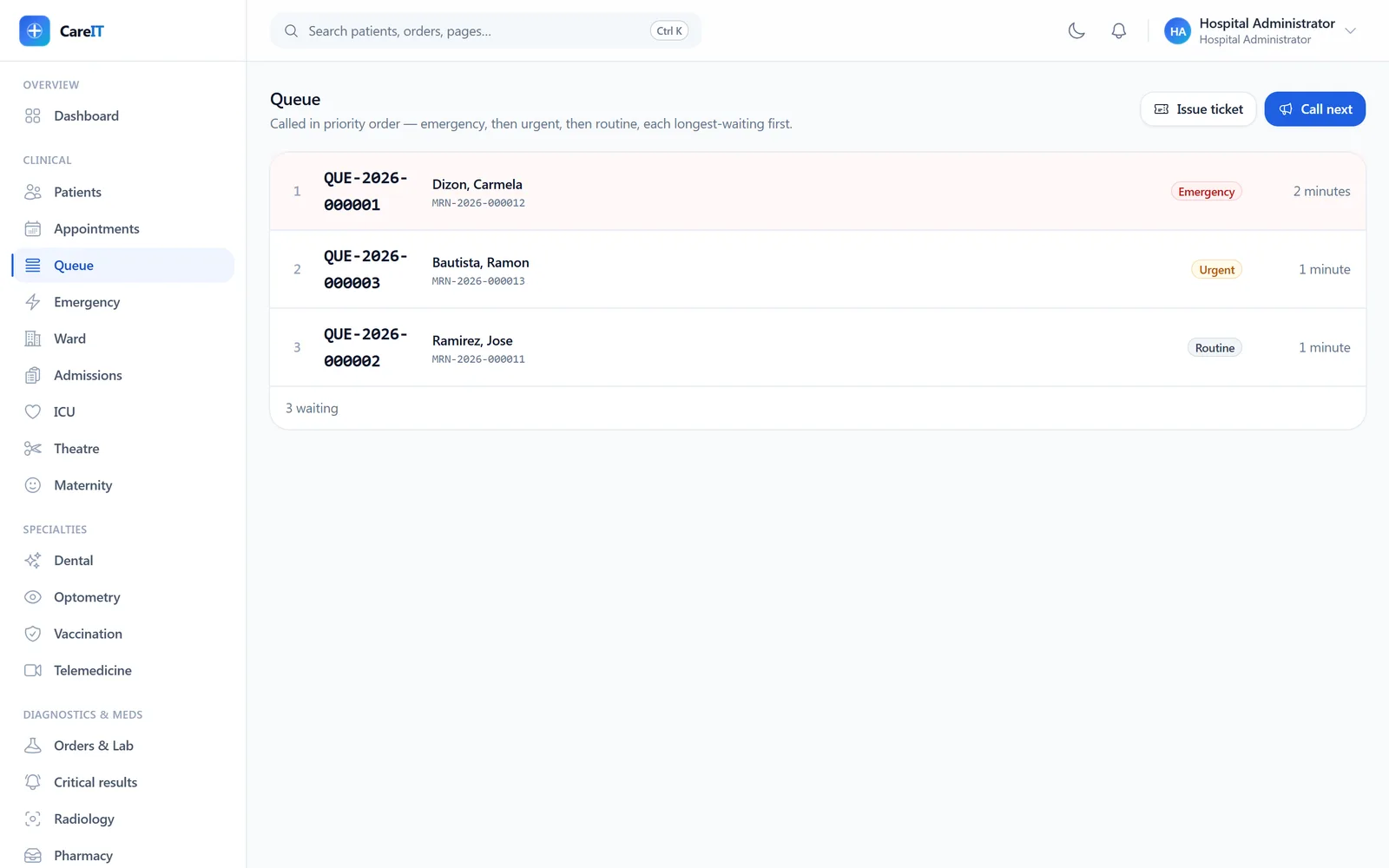
Walk-in queue with an emergency ticket ordered first

Queue

/queue

Walk-in queue tickets with call-next at the counter. Ordering is emergency → urgent → routine, then arrival — mirroring the server’s ordering exactly, so an emergency never waits behind a stack of routine tickets.

  • Issue tickets against any registered patient
  • Emergency-first calling, enforced server-side
  • Live board refresh for the waiting area

03 · Clinical care

Clinical care

From the consult room to the ward to the ICU — one append-only record, with the safety engineering visible.

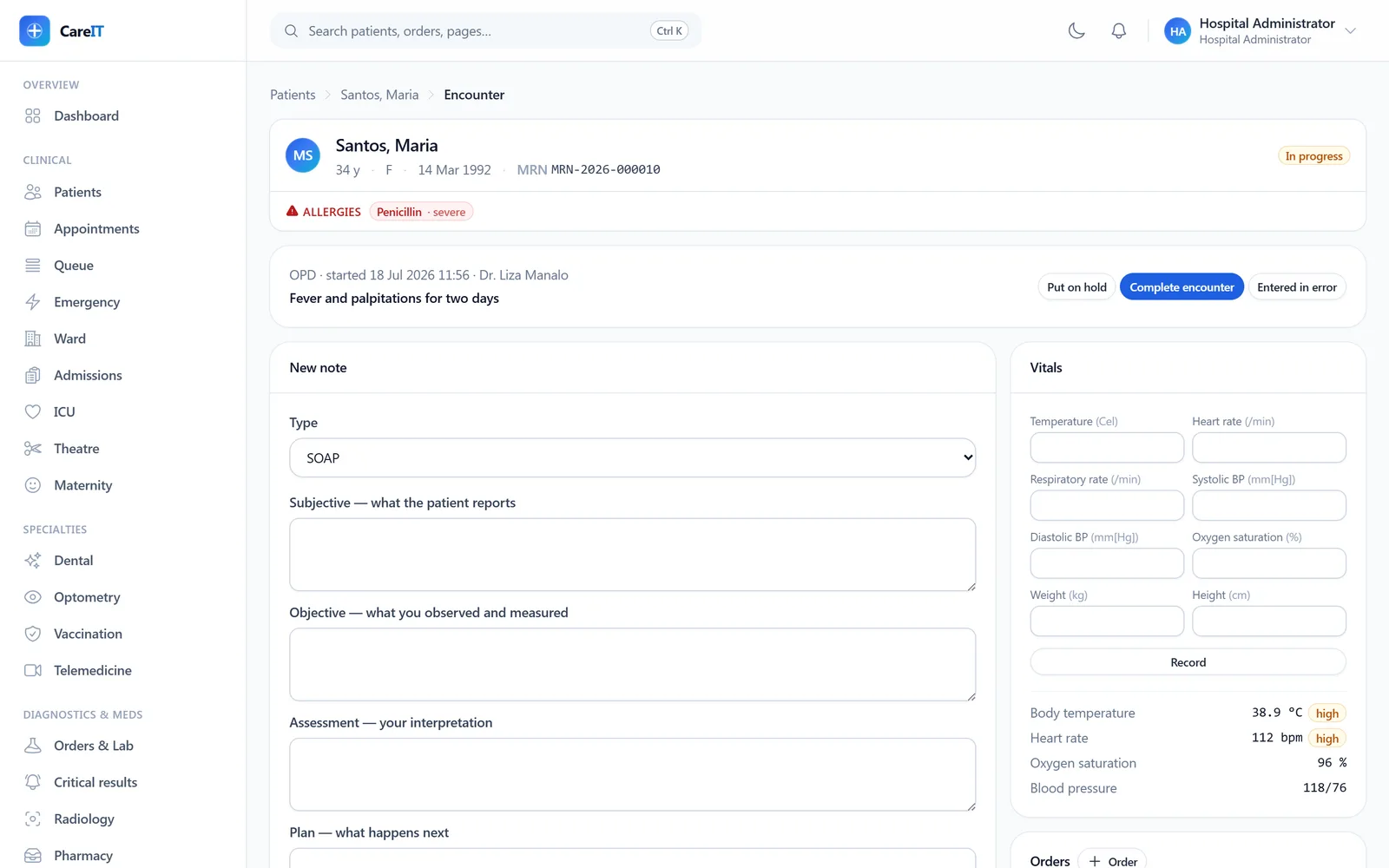
Single-screen encounter workspace: note composer, vitals with interpretation, identity banner with allergy chip

Encounter chart

/encounters/{encounter}

The 90-second consult workspace. Notes, vitals, diagnoses, orders, and prescriptions on one screen — no navigation mid-consult. Out-of-range vitals flag automatically the moment they are recorded.

  • SOAP/progress/nursing note types; amendments supersede, never overwrite
  • Vitals auto-interpreted against reference ranges (38.9 °C → high)
  • ICD-10 diagnosis typeahead from the built-in catalogue
  • Orders and e-prescriptions raised mid-consult; prescriptions signed in the flow
  • Closed encounters go read-only — every write affordance disappears
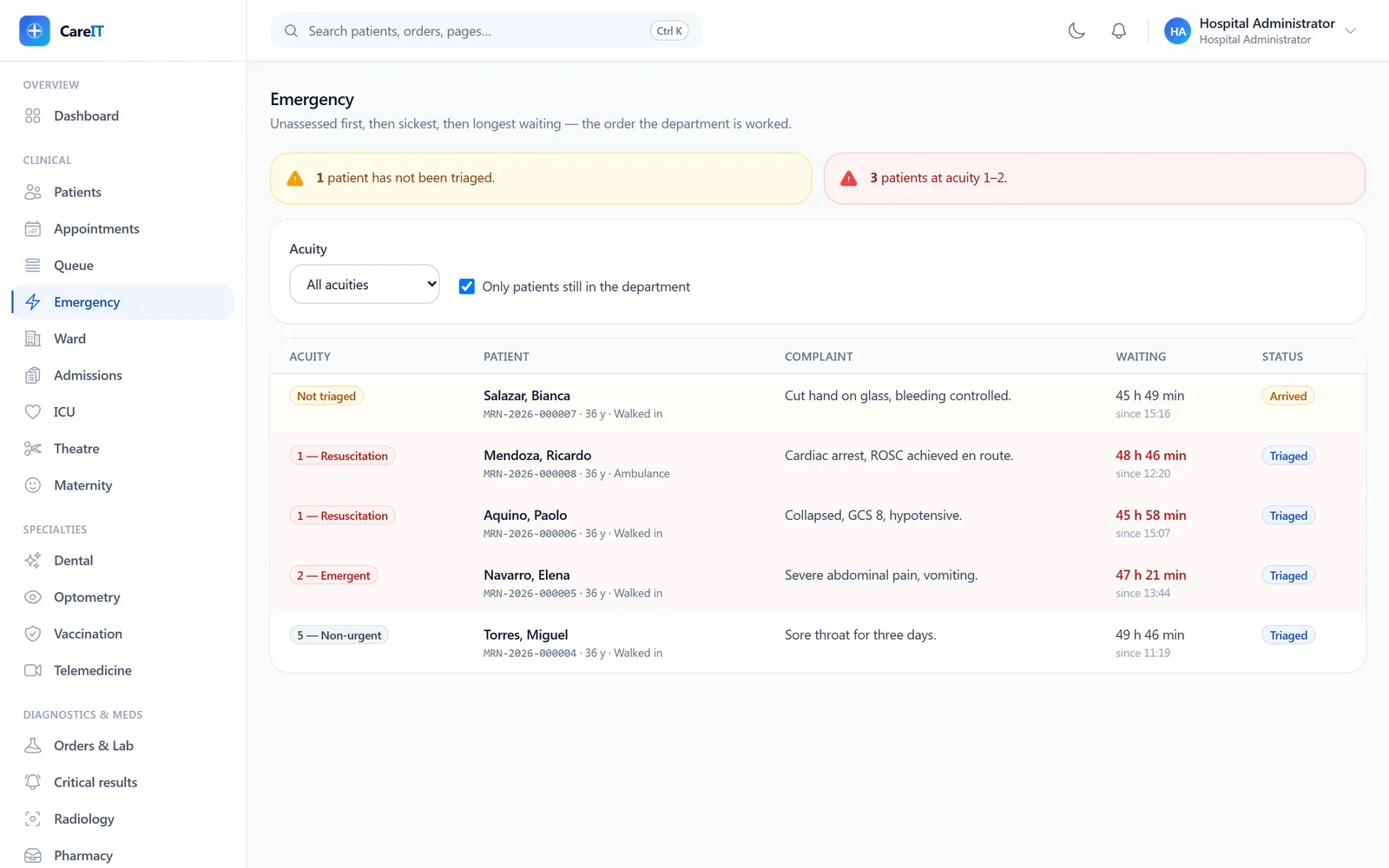
ED tracking board sorted by acuity with an unassessed arrival pinned on top

Emergency (ED board)

/emergency

A board that triages. Unassessed arrivals pin to the top — an unknown in an ED is high risk until someone looks — then acuity 1→5, then longest wait. Never arrival order.

  • Explicit acuity ordering with unassessed-first placement
  • Re-triage keeps a versioned assessment history
  • Downgrading acuity demands a stated reason — the dangerous direction is guarded
  • Waiting time per patient, visible at a glance
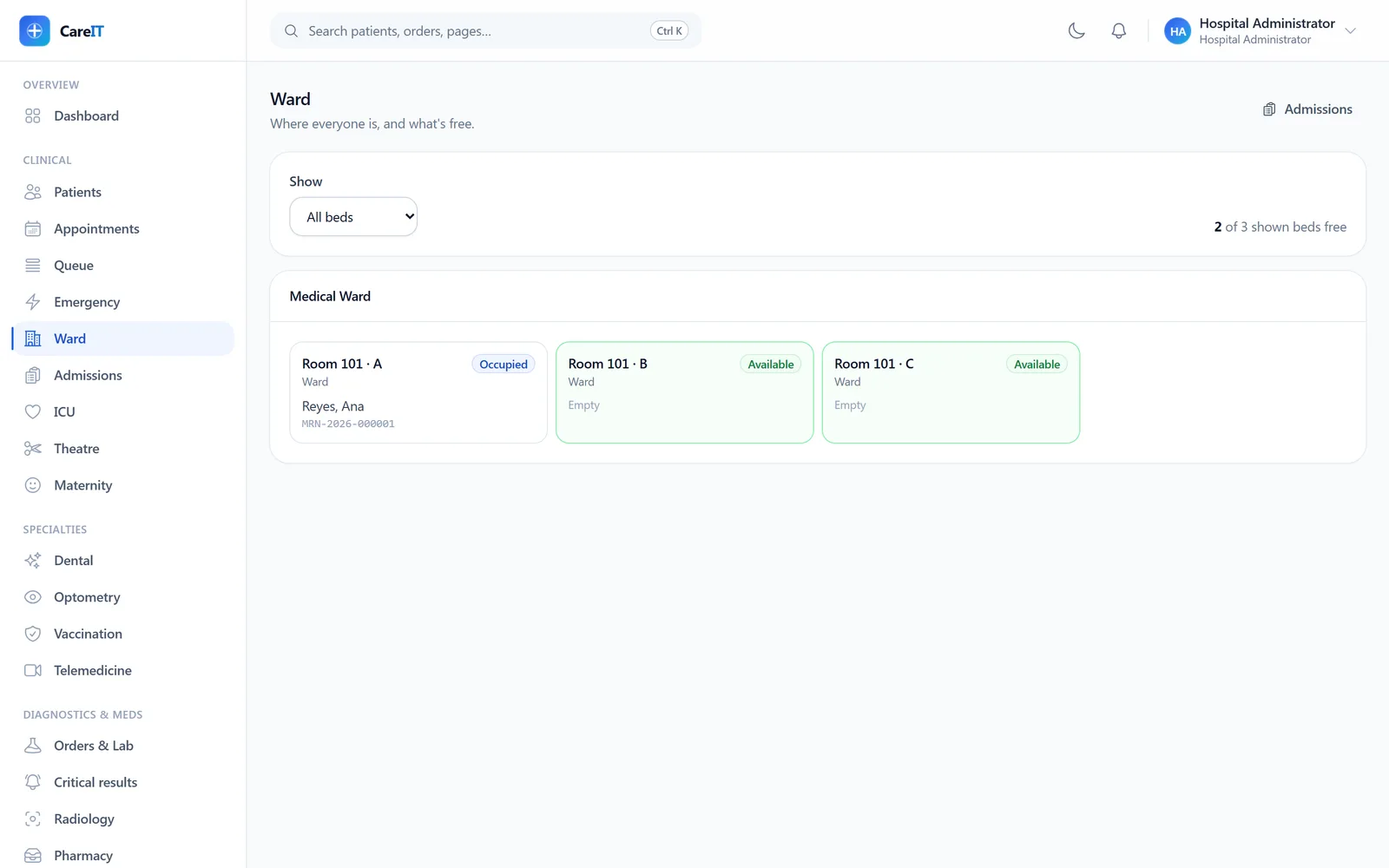
Ward board showing rooms and beds with occupancy states

Ward & beds

/ward

The bed board: wards, rooms, and beds with occupancy at a glance — who is where, and which beds are free to admit into.

  • Live occupancy per room and bed
  • Feeds admission bed assignment
  • Ward structure configured per facility during implementation
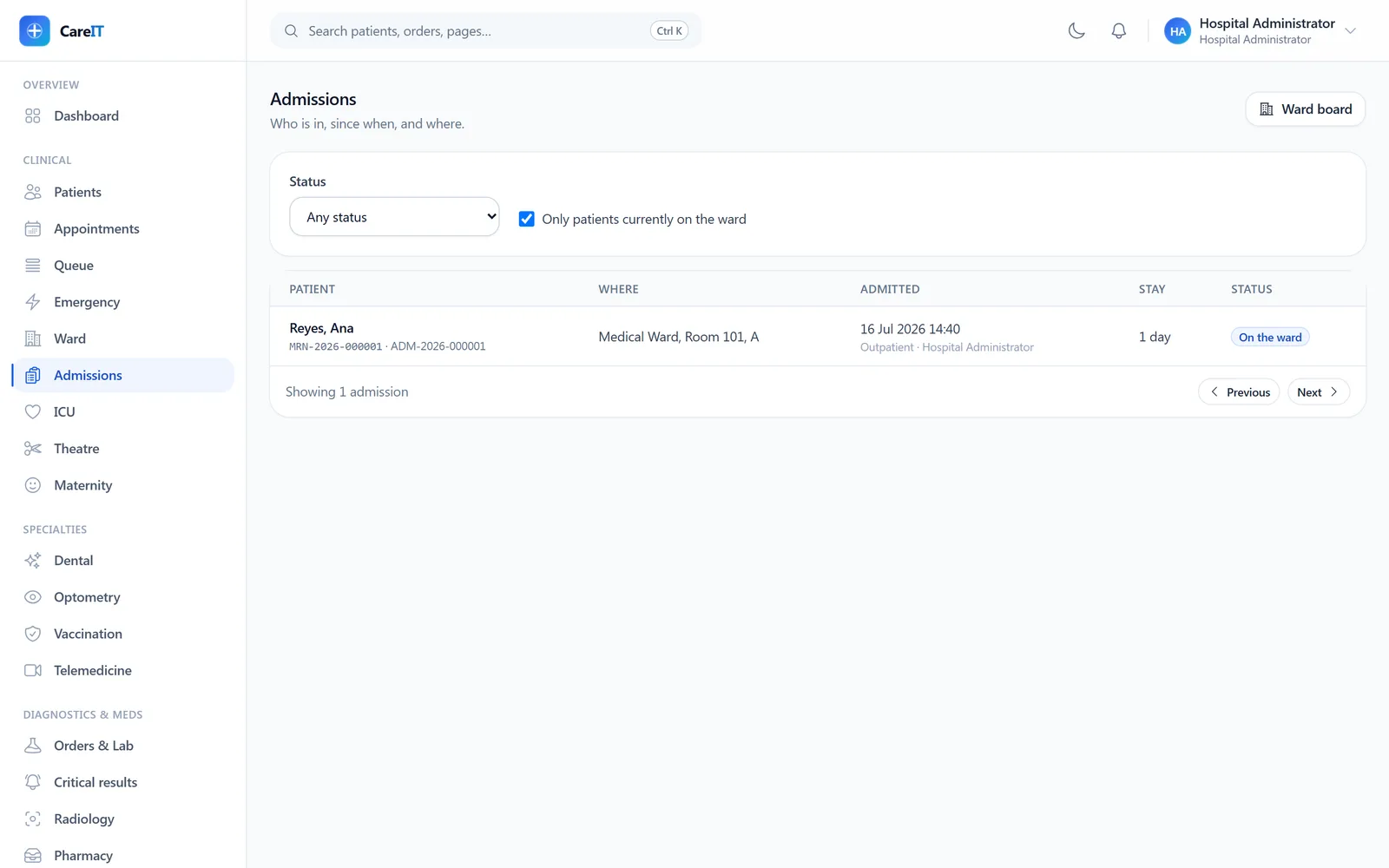
Admissions list showing an admitted patient with ward and bed

Admissions

/admissions

Every inpatient stay from admission to discharge. Discharge is deliberately two-step — discharge-pending can go back to admitted, because the second reviewer’s job is to be able to say no.

  • Admission against a real bed, with attending assignment
  • Server-owned status machine (admitted → discharge-pending → discharged)
  • Filter to patients currently on the ward
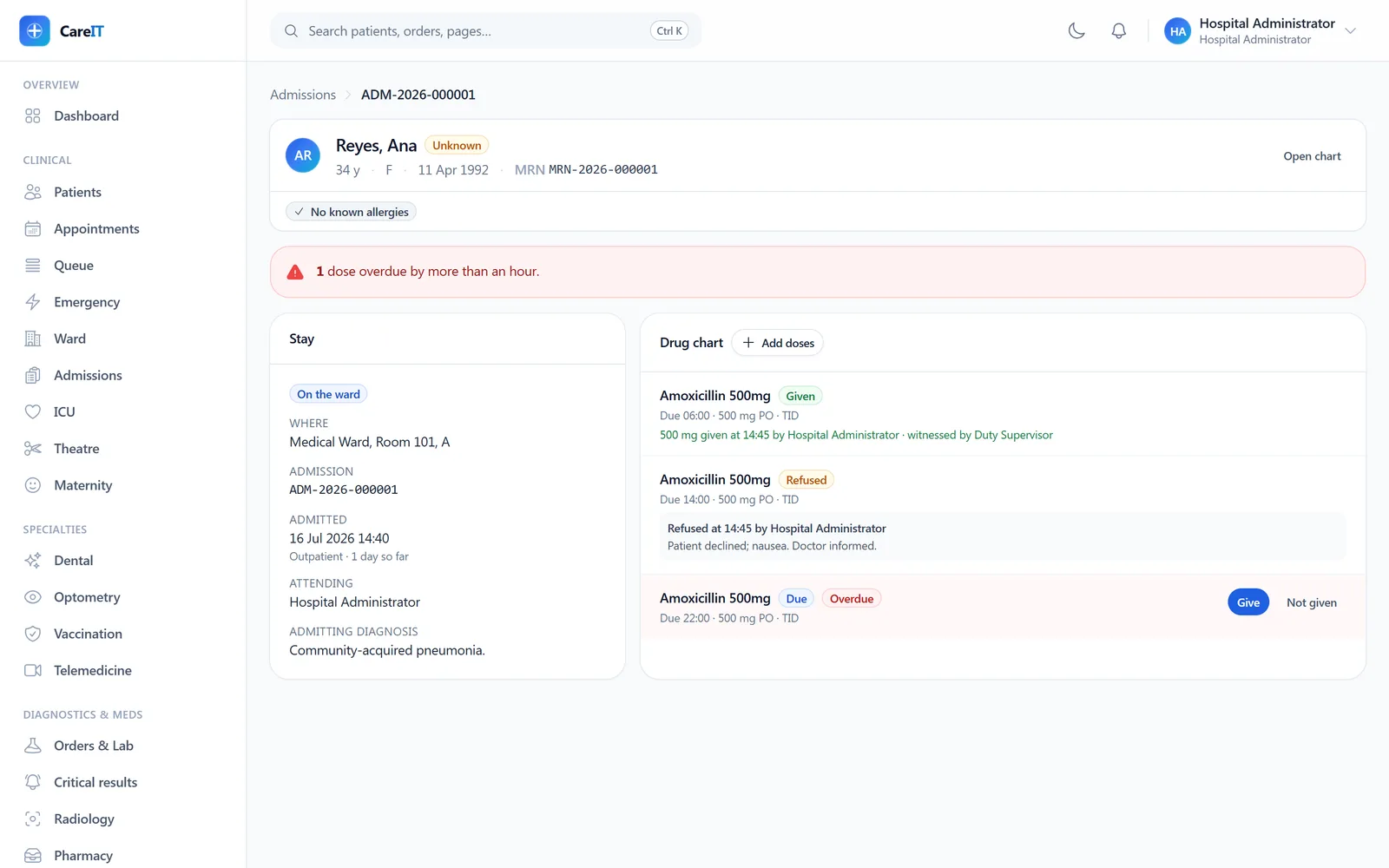
Admission detail with the electronic medication administration record showing given and refused doses

Admission detail & eMAR

/admissions/{admission}

The electronic medication administration record. Scheduled doses per prescription, recorded as given, refused, or held — a refused dose never sits as “still due”. Dose times are typed by the ward exactly as prescribed; “TID” is shown verbatim, never guessed into clock times by a parser.

  • Dose schedule built from the signed prescription
  • Given / refused / held with reasons — honest states, not just “given”
  • Overdue doses flagged against facility time, not server time
  • Identity banner with allergies pinned above the drug chart
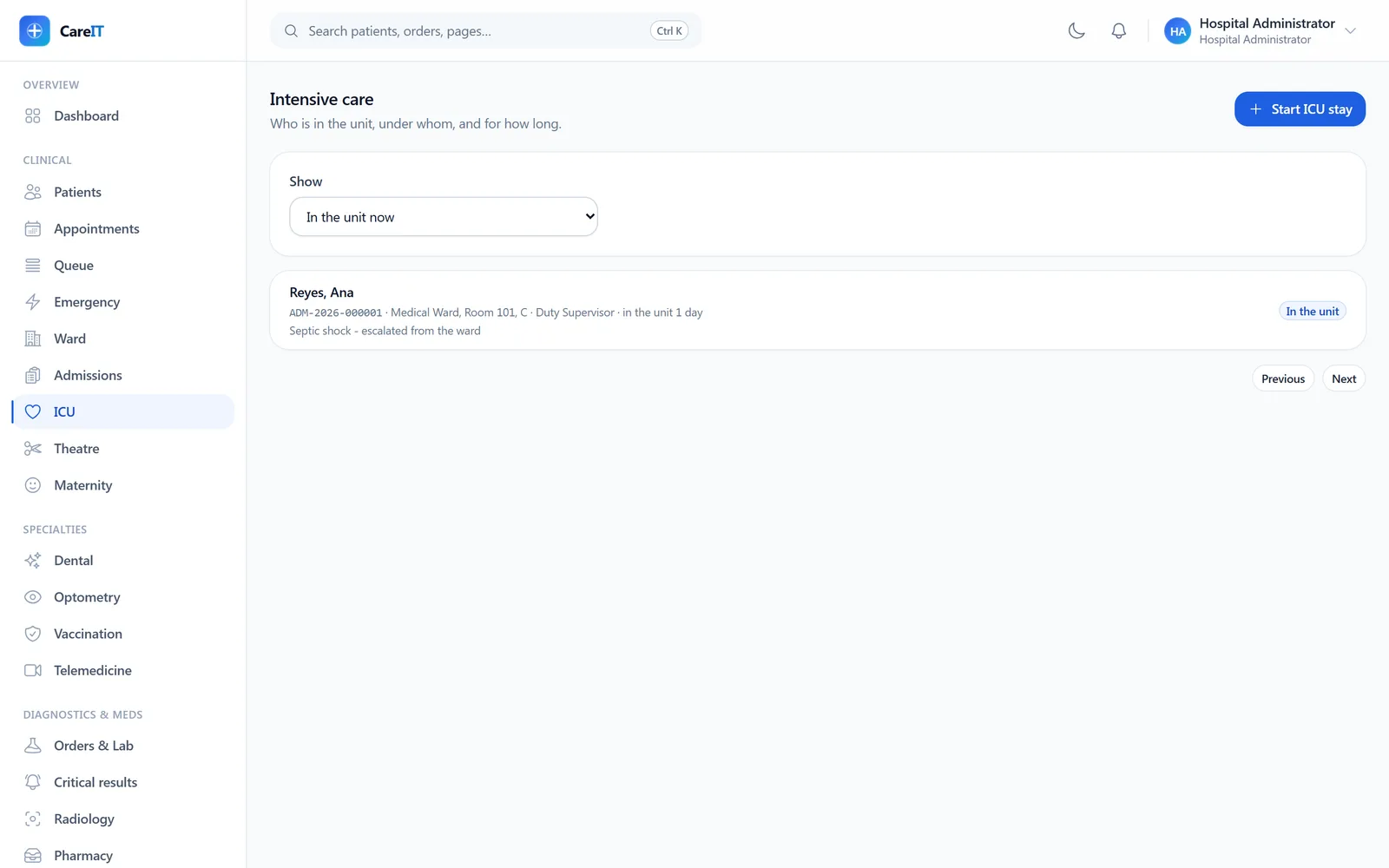
ICU board listing an active intensive-care stay

ICU

/icu

Intensive care stays with flowsheets, devices, and severity scores. Flowsheet entries can be corrected — the correction supersedes and the original stays visible, struck through.
  • Hourly flowsheet with net fluid-balance totals per code
  • Corrections supersede; a superseded entry can never be corrected again (no forks)
  • Device tracking with days-in-situ — CLABSI day counts amber at 7 days
  • Severity scores recorded with their component breakdowns
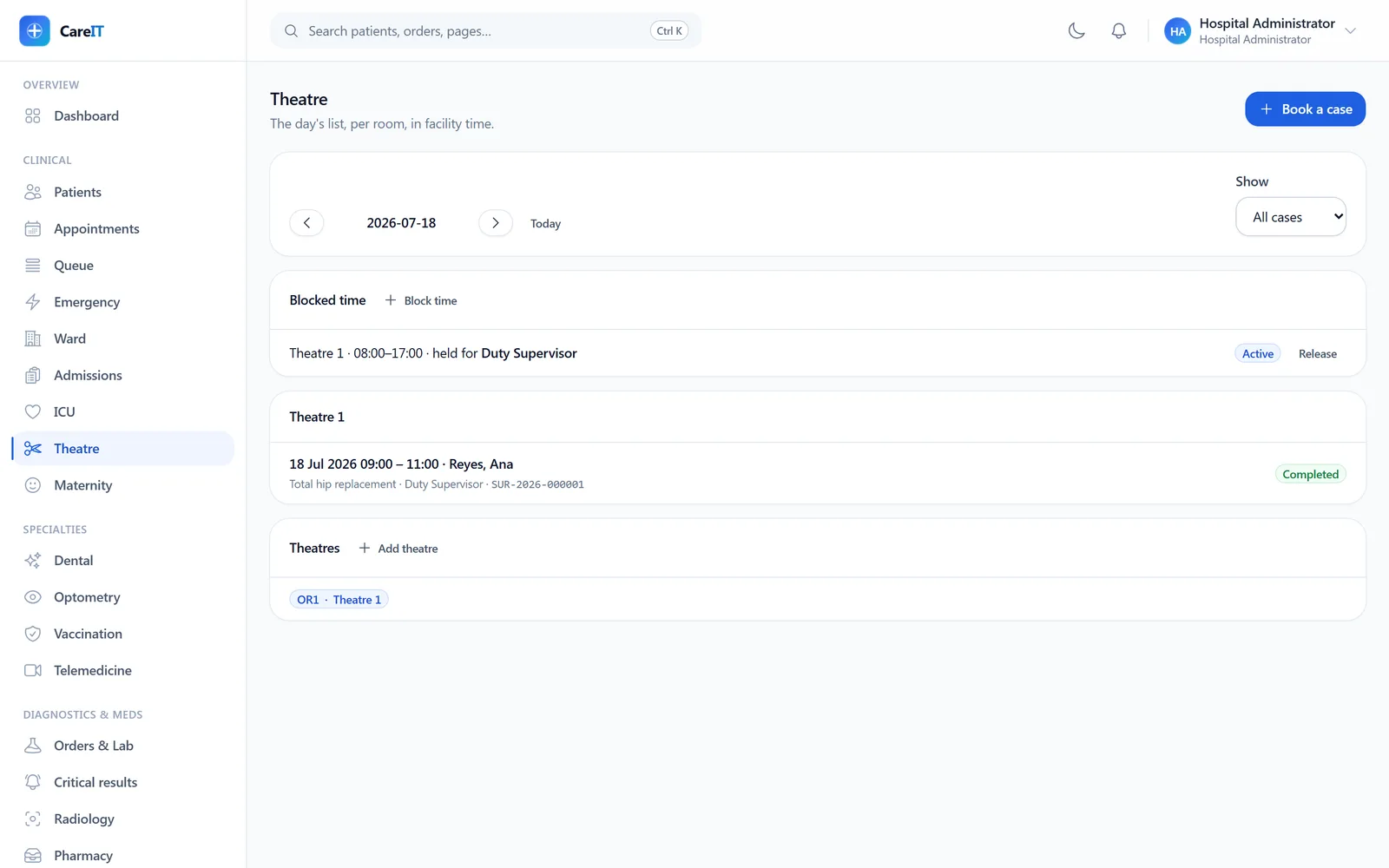
Theatre day board with a booked case, block time, and theatre list

Operating theatre

/theatre

The surgical day: cases per theatre, block bookings that are actually enforced, and a case pipeline gated by the surgical safety checklist — a case cannot start until sign-in is recorded.
  • Case booking with patient, encounter, and team builder
  • Block time enforcement: booking over another team’s block is refused
  • Checklist gates: sign-in, time-out, sign-out — recorded per case with exceptions
  • Implants recorded against the surgeon’s stated lot, so the recall record never lies
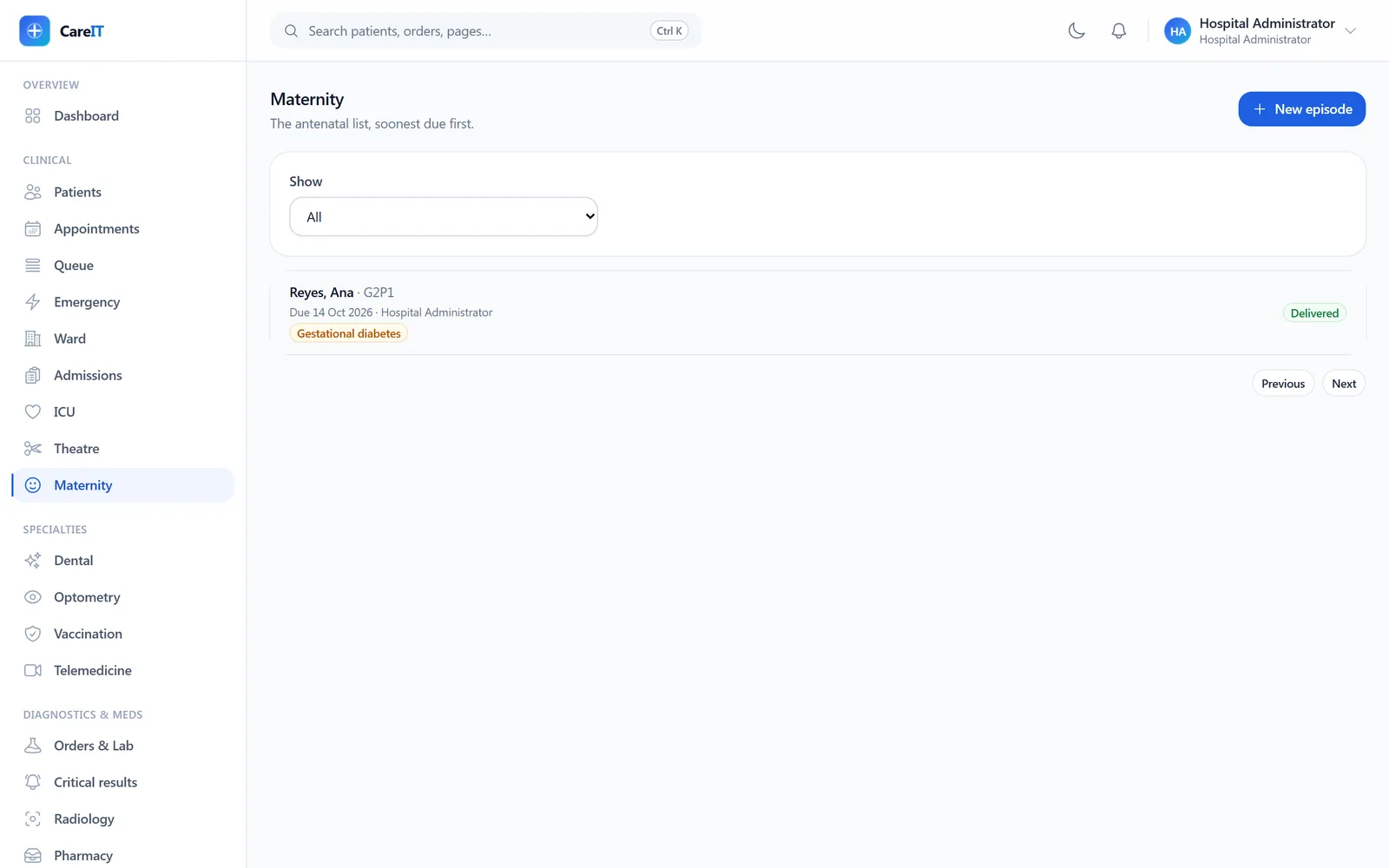
Maternity episode list showing a delivered pregnancy with risk badge

Maternity

/maternity

Pregnancy episodes from antenatal visits through delivery and postpartum. Mother and newborn stay distinct patients linked by the delivery — the newborn gets their own MRN and chart.

  • Antenatal visits with gestational-age prefill
  • Delivery recording with newborn linking and Apgar scores
  • Postpartum assessments after delivery
  • Episodes that don’t end in delivery are closeable with a reason — no patient stuck “pregnant forever”

04 · Specialties

Specialties

Purpose-built clinical suites that write into the same record as everything else.

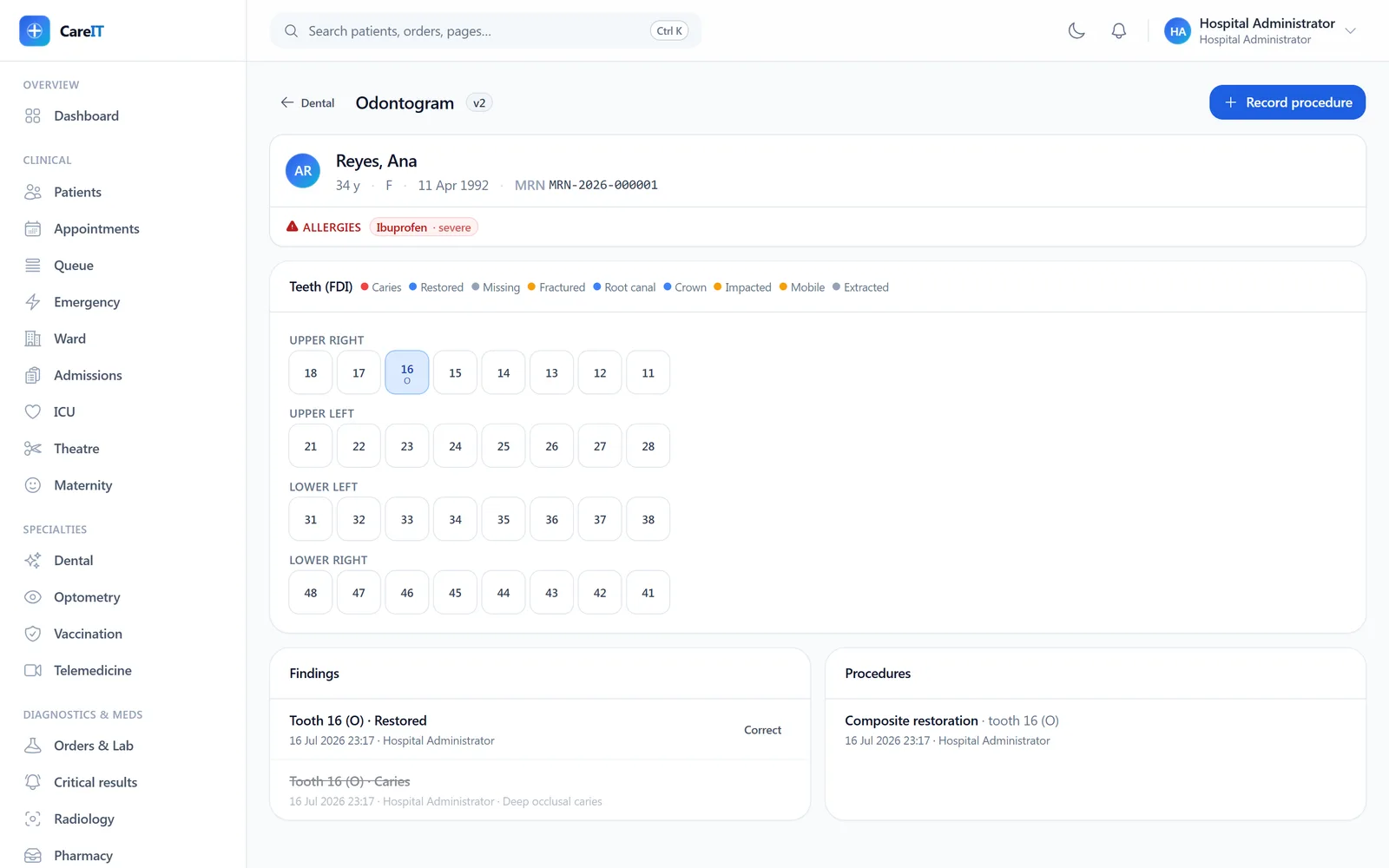
FDI odontogram painted by tooth condition with findings and procedures below

Dental (odontogram)

/dental/{patient}

A clickable FDI odontogram painted by each tooth’s current condition. Click a tooth to record a finding; corrections supersede the old finding and bump the chart version.

  • Per-tooth findings with surface notation
  • Corrections are same-tooth, single-supersede — the chain stays readable
  • Procedures recorded against the service catalogue capture charges automatically
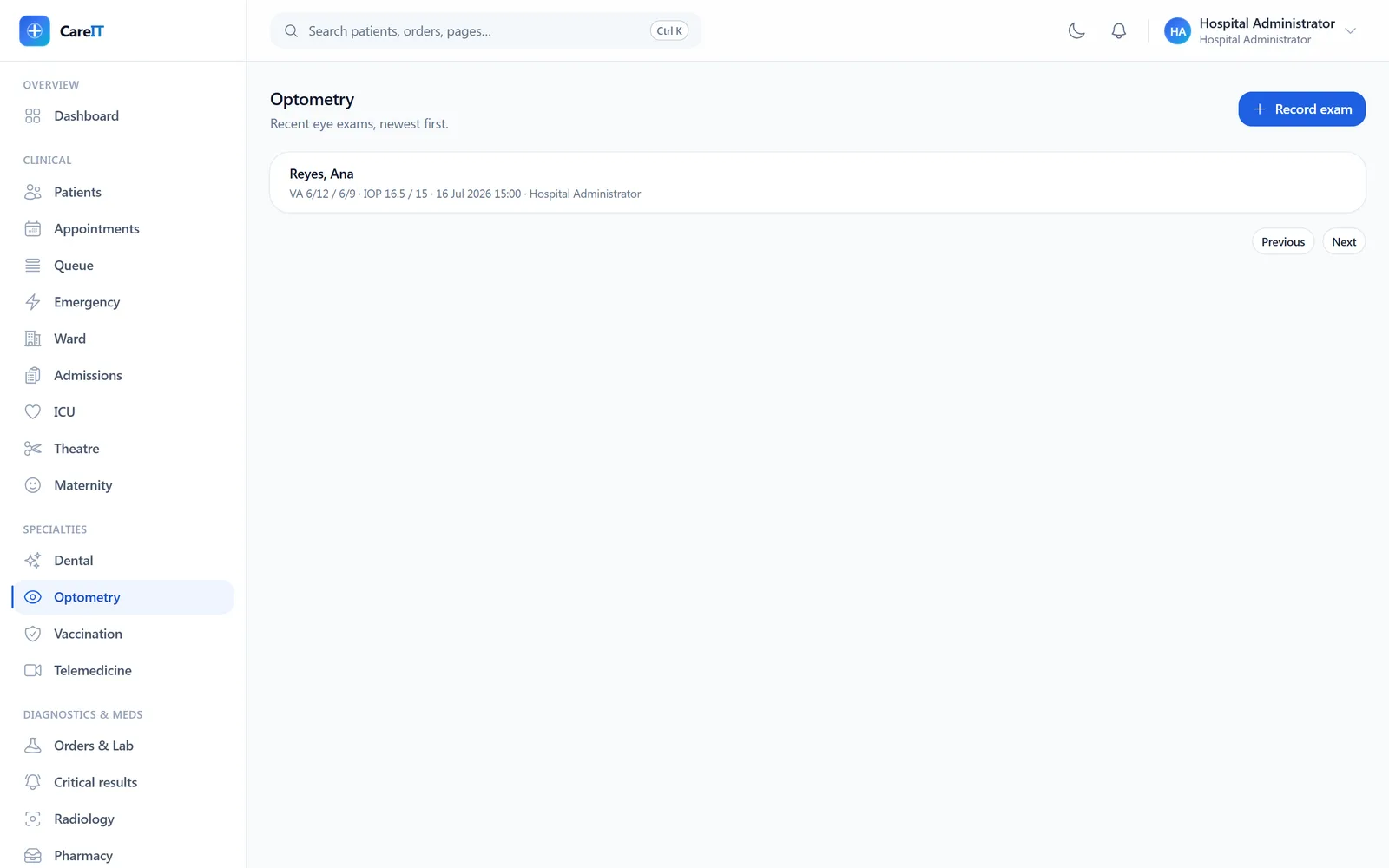
Optometry exam list with visual acuity and pressure recordings

Optometry

/optometry

Eye exams with per-eye acuity and pressure, and optical prescriptions with sign-once discipline: a signed prescription can only be superseded, never edited — two “current” prescriptions is how the wrong lenses get ground.

  • OD/OS sphere, cylinder, axis, and add per prescription
  • Sign-once; superseding prefills from what it replaces
  • Supersession guarded to the same patient
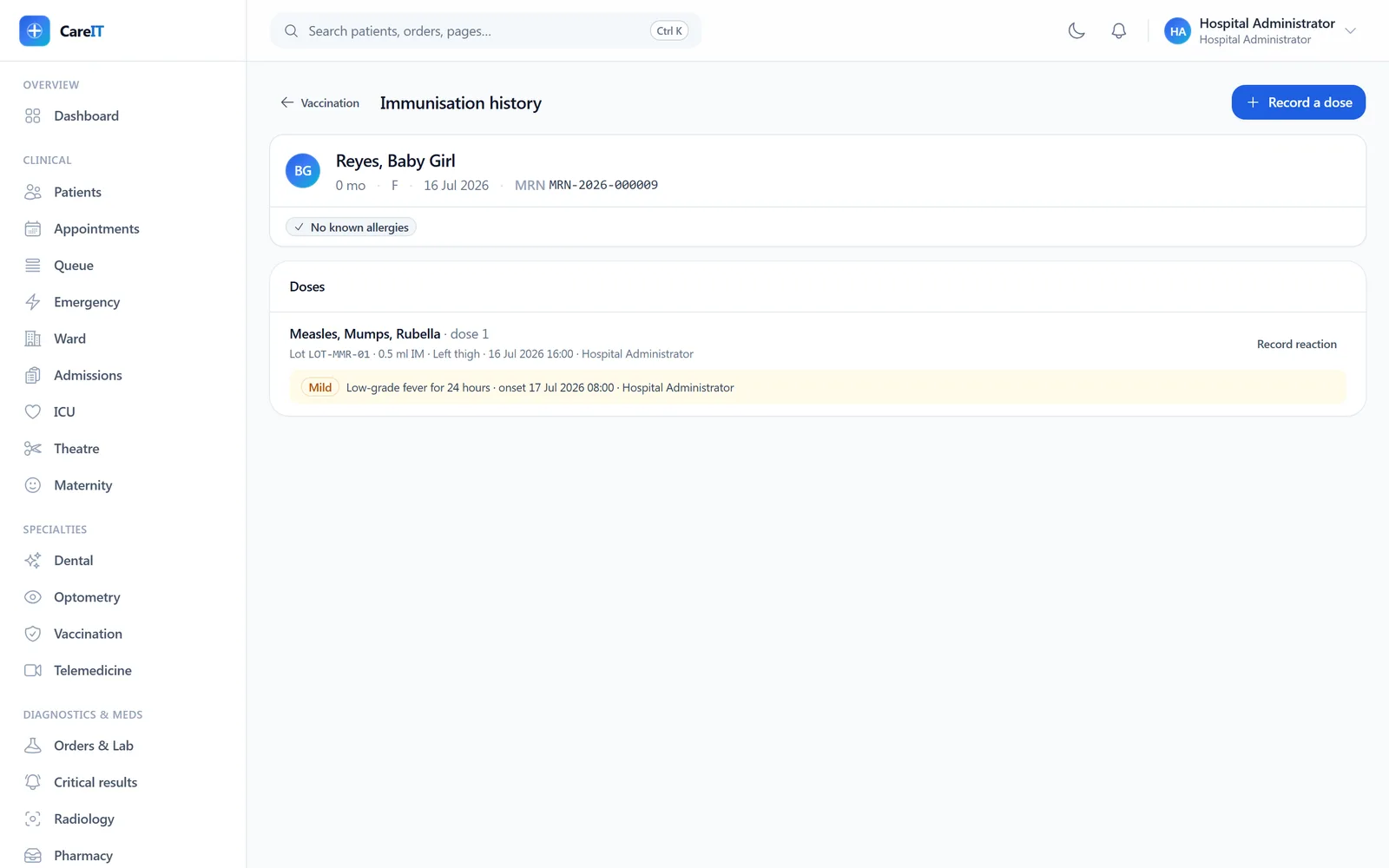
Immunization history with dose, lot, and an adverse-event record

Vaccination

/vaccination/{patient}

Dose administration against real vaccine lots in stock, with dose-interval rules enforced (“too soon” is refused), adverse events (AEFI) recorded inline, and certificates anyone can verify by code.

  • Lot picker shows expiry and on-hand from inventory
  • The recorded lot is the vial in the nurse’s hand — AEFI investigations depend on it
  • Minimum dose intervals enforced per vaccine definition
  • Public certificate verification by code — an answer, not an error
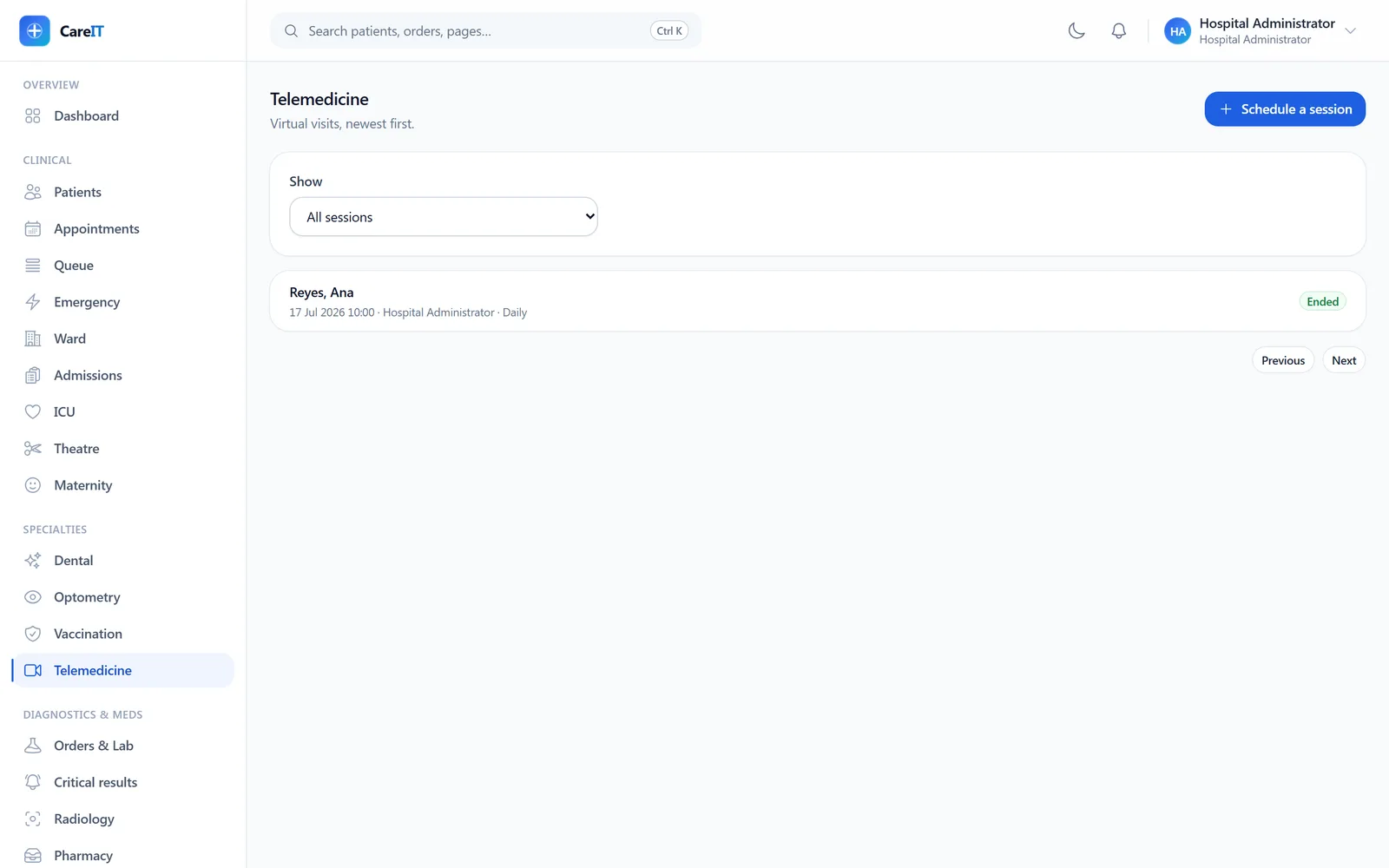
Telemedicine session list with a completed consult

Telemedicine

/telemedicine

Remote consult sessions scheduled from real appointments. Consent gates the camera — no recorded consent, no session start — and join tokens are minted per participant, shown exactly once.

  • Consent recorded and versioned per patient before start
  • Participant join tokens are self-only unless you hold session-manage rights
  • Cancellations capture the fallback plan
  • Video-provider integration is roadmap; session governance ships today

05 · Diagnostics & medication

Diagnostics & medication

Stat-first worklists, verify-then-release results, and dispensing with guardrails.

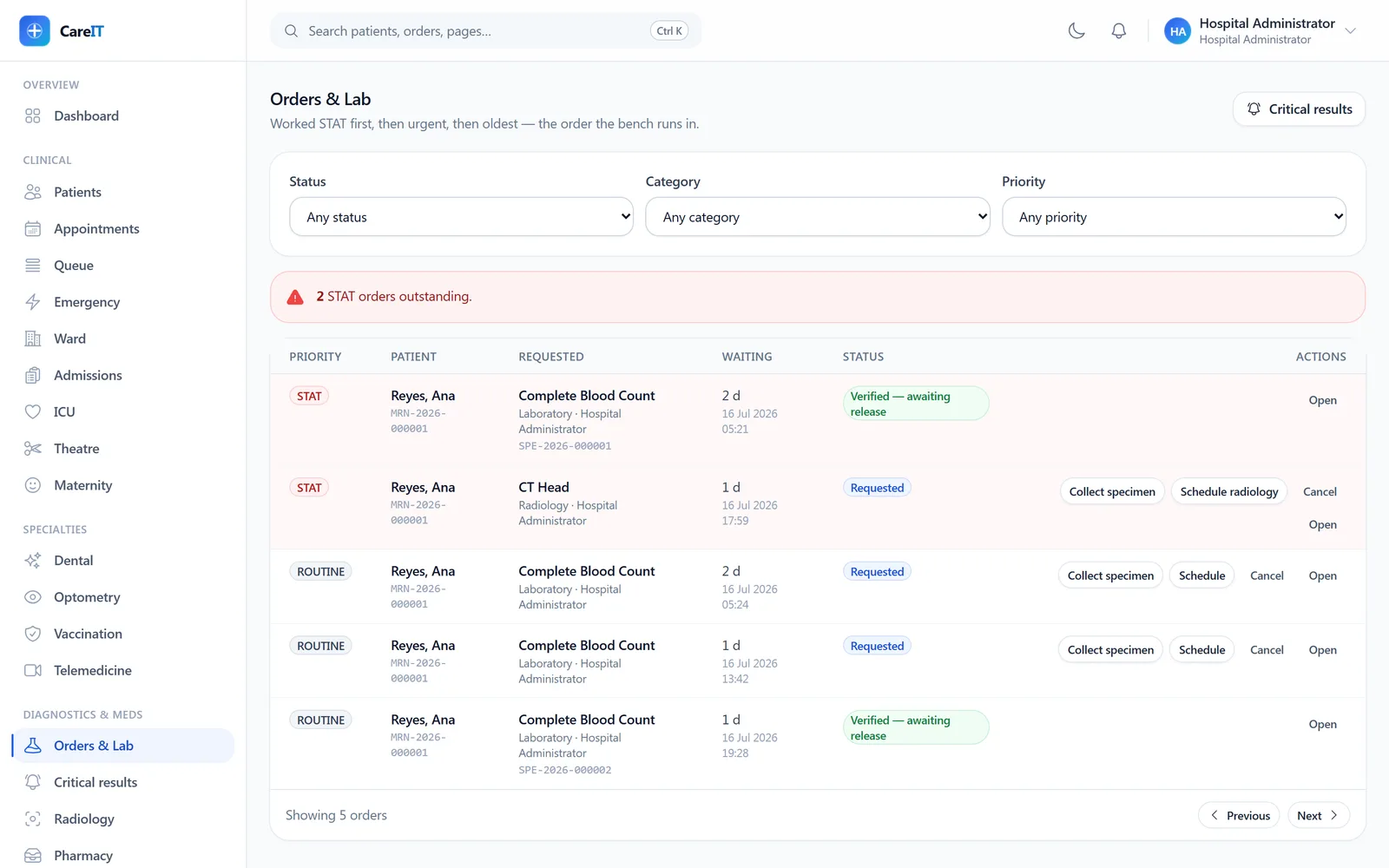
Order worklist with stat rows tinted and per-row actions

Orders & lab worklist

/orders

The diagnostic worklist, ordered stat → urgent → routine → longest-waiting, rendered exactly as the server sends it. Collection, result entry, verification, and release each advertise themselves only when legal.

  • Stat rows visually tinted and always on top
  • Result entry with units and reference ranges; verification before release
  • Each order’s report shows its own observations — never another order’s
  • Charges captured automatically as orders complete
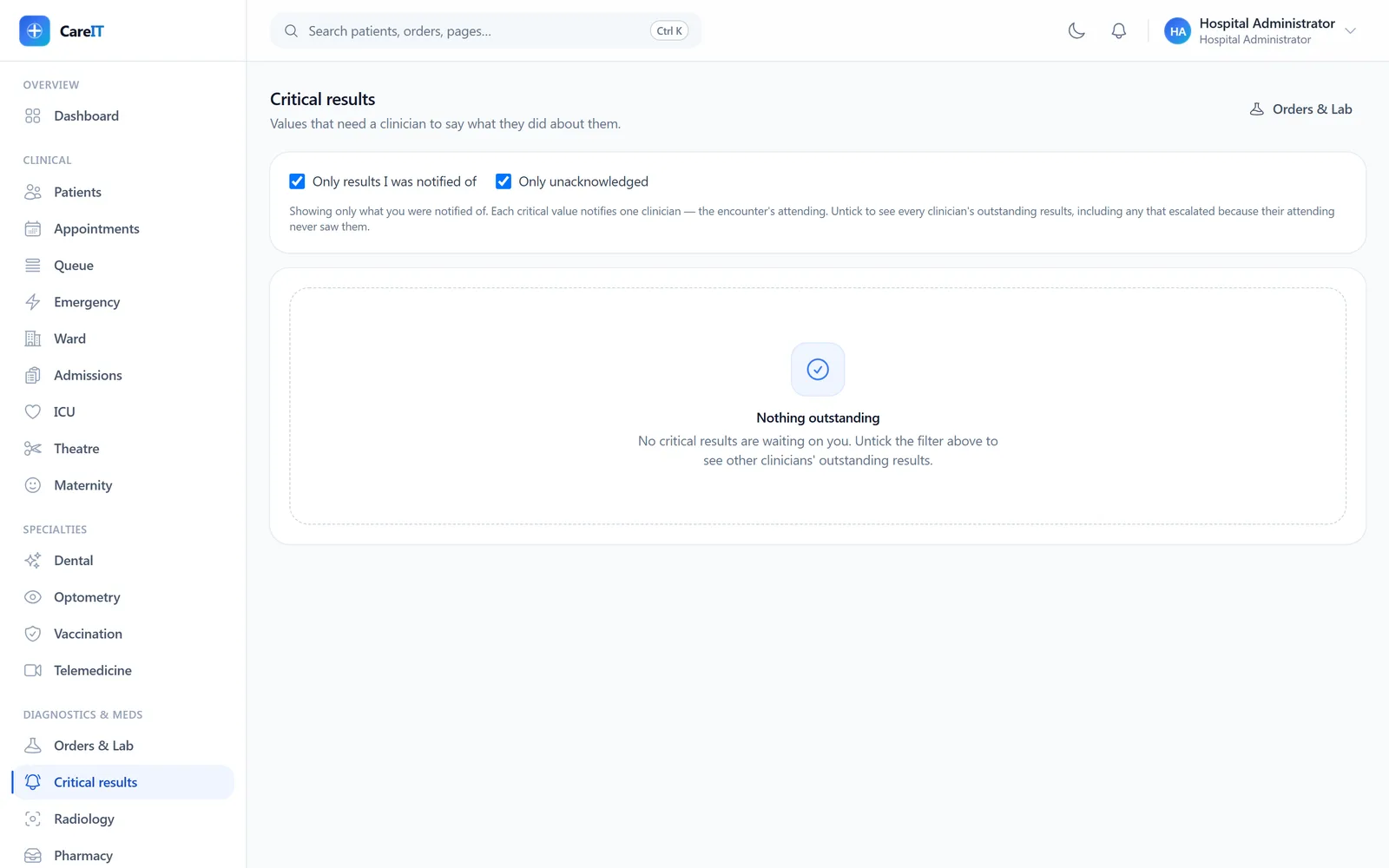
Critical results queue in its cleared state

Critical results

/critical-results

The escalation queue for critical lab values. Everyone with acknowledge authority is notified; unacknowledged criticals escalate again on a deadline. A cleared queue — like this one — means every critical was answered.

  • Acknowledgement recorded with who and when
  • Deadline-driven re-escalation until someone acts
  • Critical flags come from explicit rules or the verifying clinician — never arithmetic
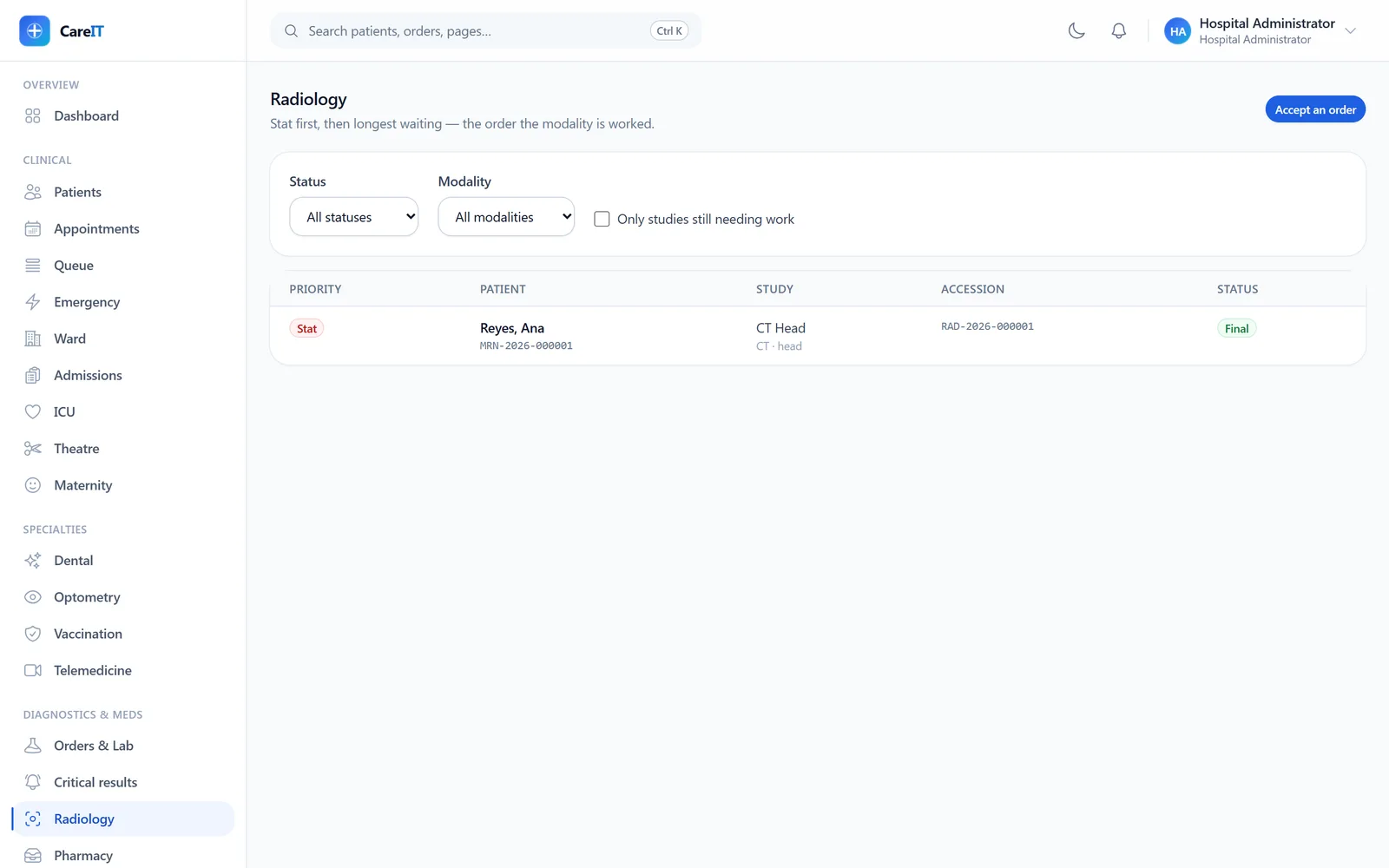
Radiology worklist showing a stat CT study with final status

Radiology

/radiology

Imaging from accepted order to signed report: schedule, arrive, acquire (with PACS system, UID, and link metadata), then report. A study is final only when a radiologist signs — not when the scanner ran.

  • Stat-first worklist, same ordering discipline as the lab
  • Report drafts, signing, and amendments as new versions — the trail stays readable
  • Critical findings escalate with acknowledge deadlines, pinned above the worklist
  • An attending may sign a resident’s draft — attestation is recorded honestly
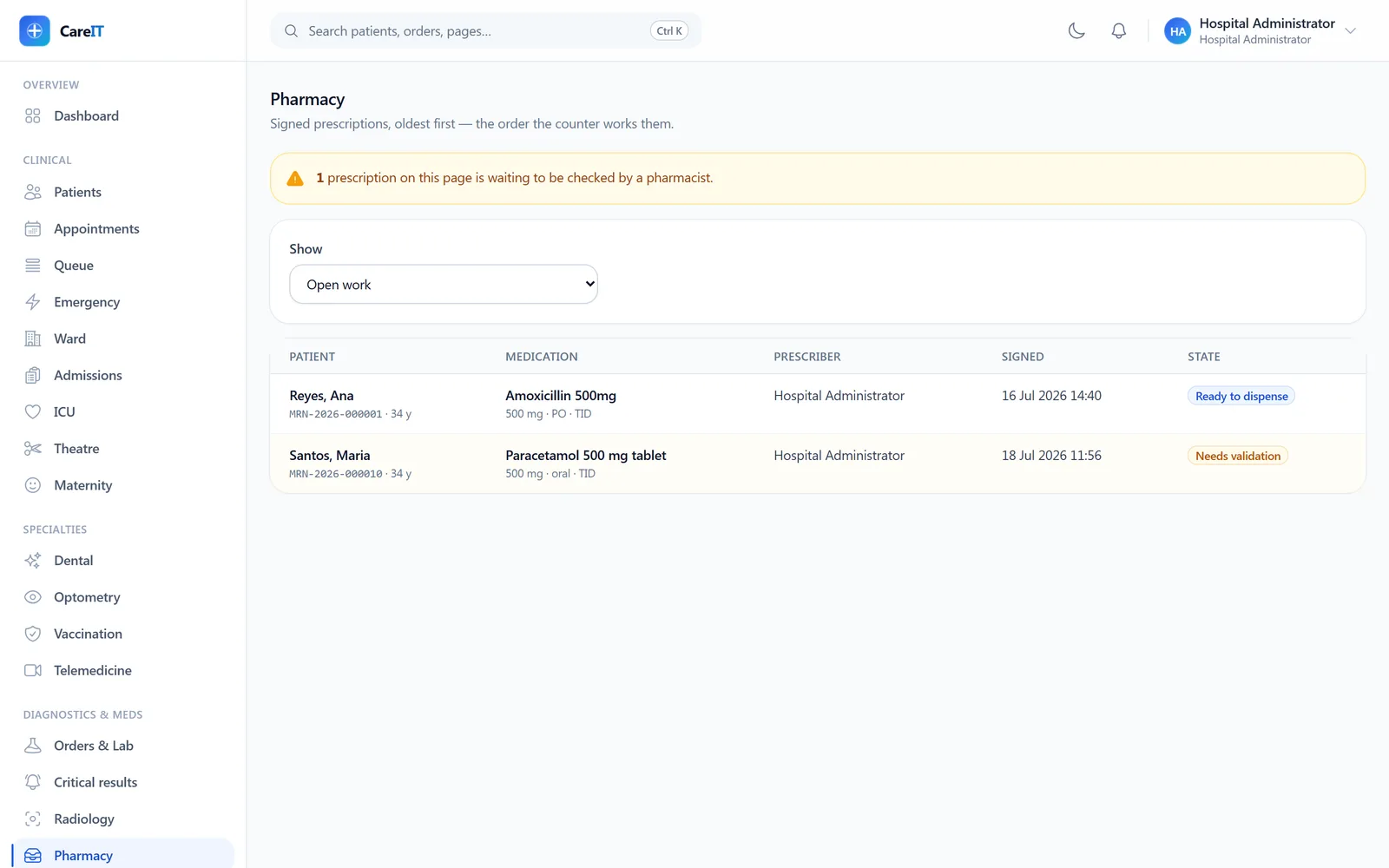
Pharmacy queue with a prescription awaiting pharmacist validation

Pharmacy

/pharmacy

Signed prescriptions land here oldest-first — the order the counter works them. Validation (with recorded alert overrides) comes before dispensing; controlled drugs demand a witness.

  • Pharmacist validation with blocking-alert override reasons on record
  • FEFO dispensing against live on-hand stock at the chosen location
  • Controlled-drug dispenses require a witness picker
  • Reversals restock and void the charge in one step

06 · Care coordination

Care coordination

Longer-running care, secure staff messaging, and the patient-facing surfaces.

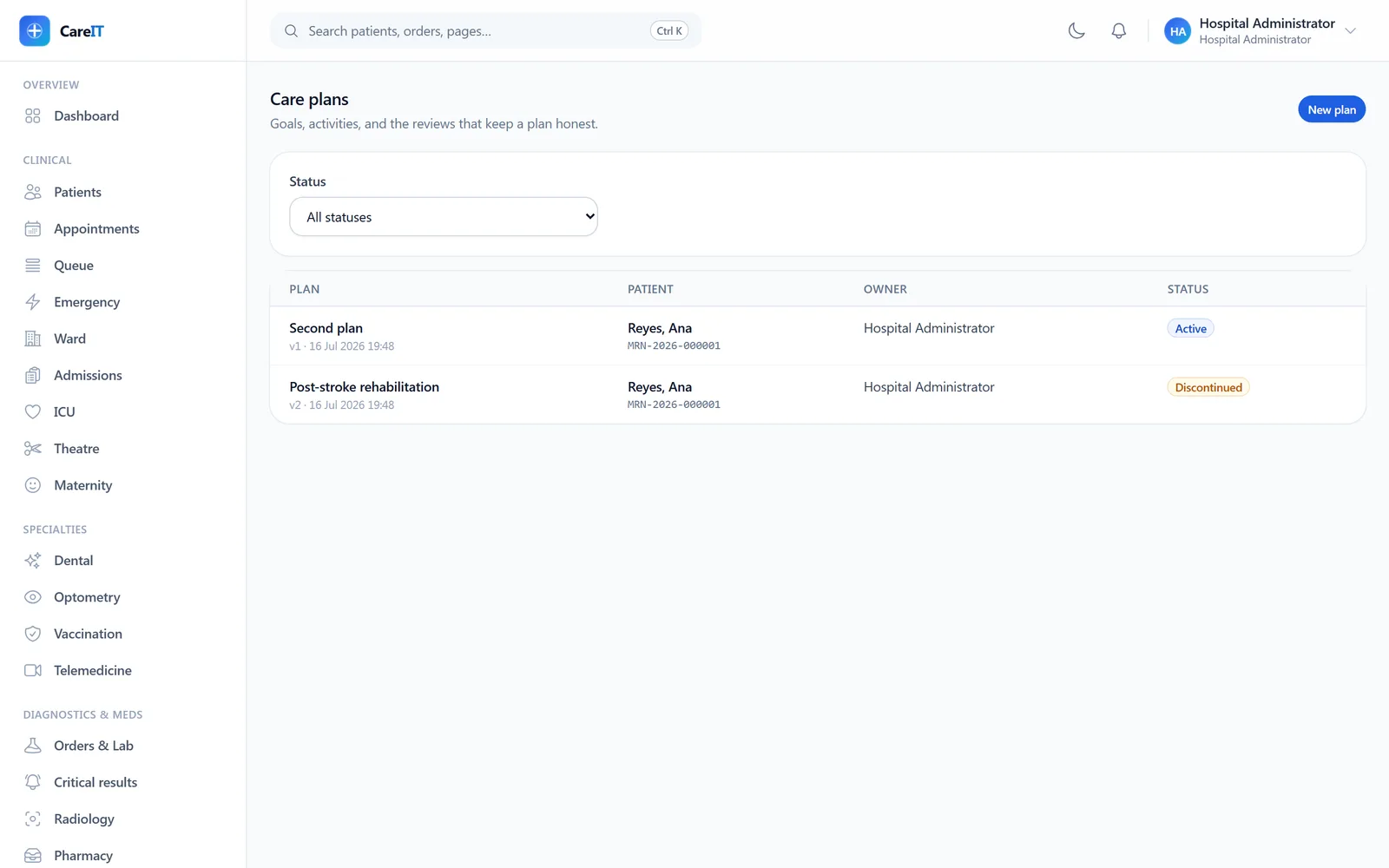
Care plan list with active and discontinued plans

Treatment plans

/treatment-plans

Goal-driven care plans: goals, assignable activities with due times, progress notes, and formal reviews. A revise review bumps the plan version; a discontinue review ends it — with notes required either way.

  • Goals resolve as achieved or abandoned, only on an active plan
  • Activities carry facility-local due times, normalized correctly
  • Progress can’t be empty, and can’t be recorded against another plan’s goal
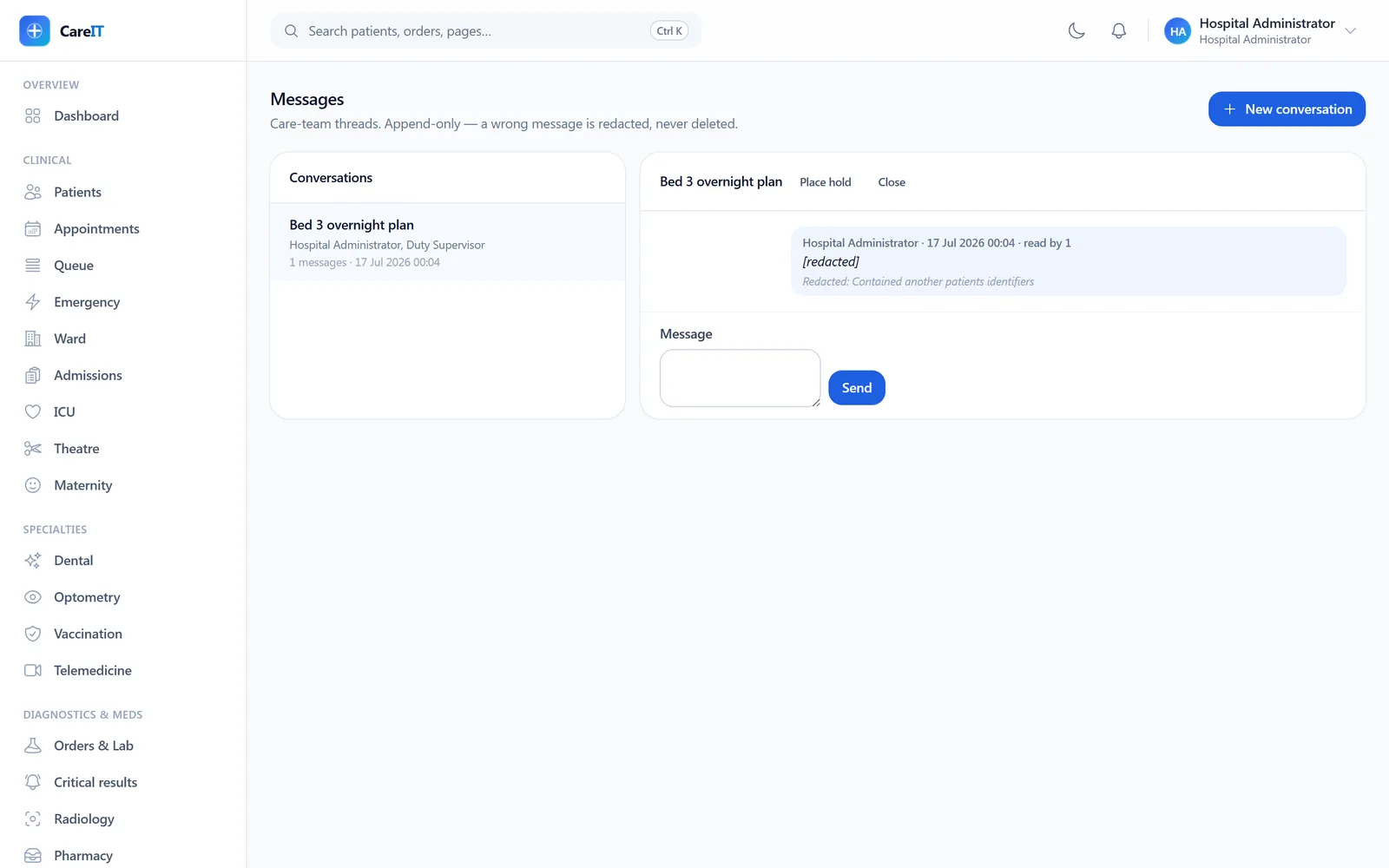
Care-team thread showing a redacted message tombstone with reason

Messages

/messages

Care-team threads with append-only discipline: a wrong message is redacted — leaving a visible tombstone with the reason — never silently deleted. Legal hold freezes a conversation; redaction is refused while a hold stands.

  • Membership is the access rule — you read only threads you are in
  • Read receipts per message
  • Legal hold blocks destructive actions until released
  • Attachment metadata with member-gated access
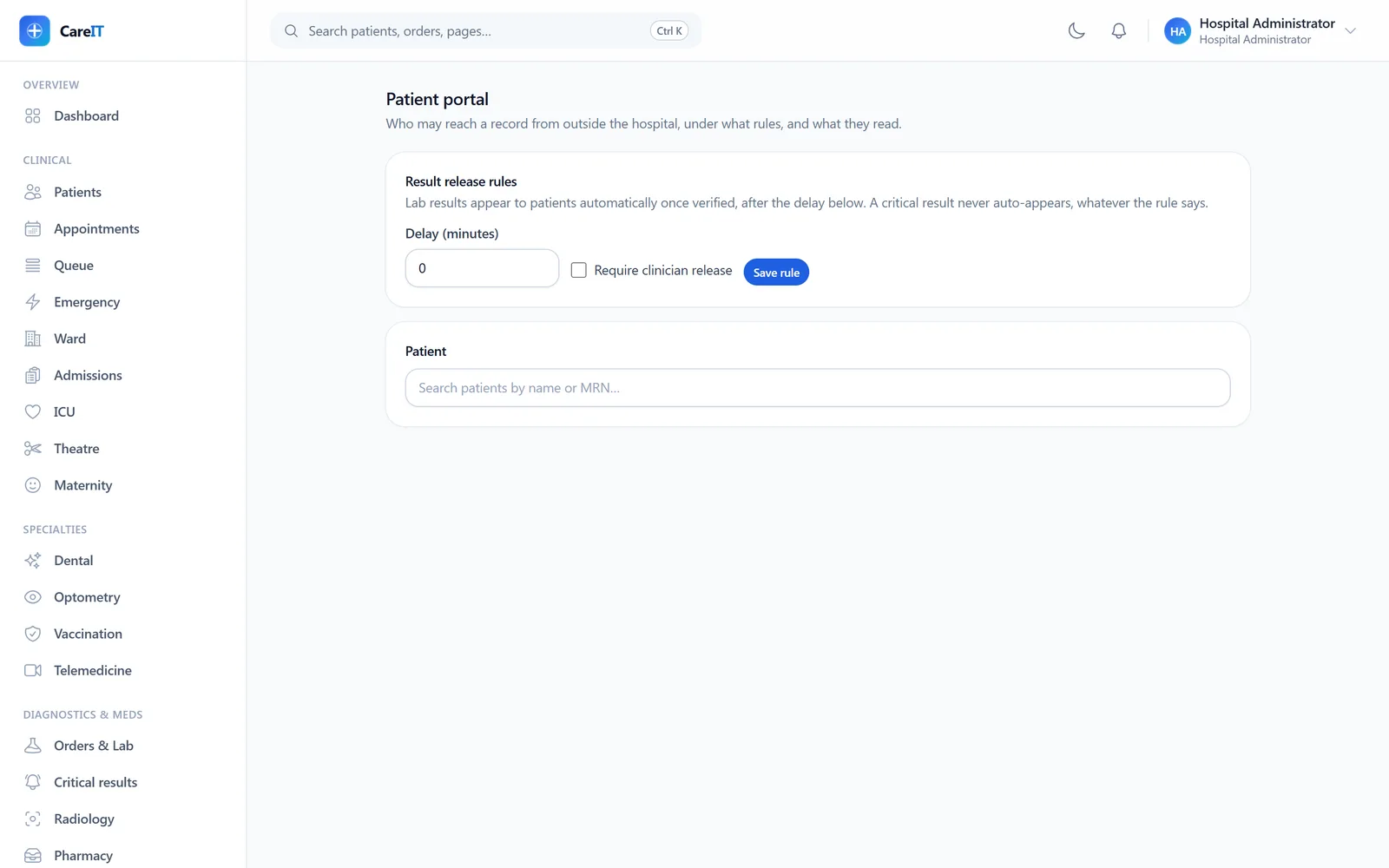
Portal administration with release rules and account management

Patient portal admin

/portal-admin

Staff-side control of the patient portal: invite accounts, manage proxy access (a parent for a child), record consents, and set release rules for results. A critical result never auto-releases, whatever the rule says.

  • Release rules with configurable delay and clinician-release requirements
  • Proxy grants with scopes and expiry — enforced, not decorative
  • Every portal read lands in the audit trail against the patient
  • Closing access revokes all live tokens immediately
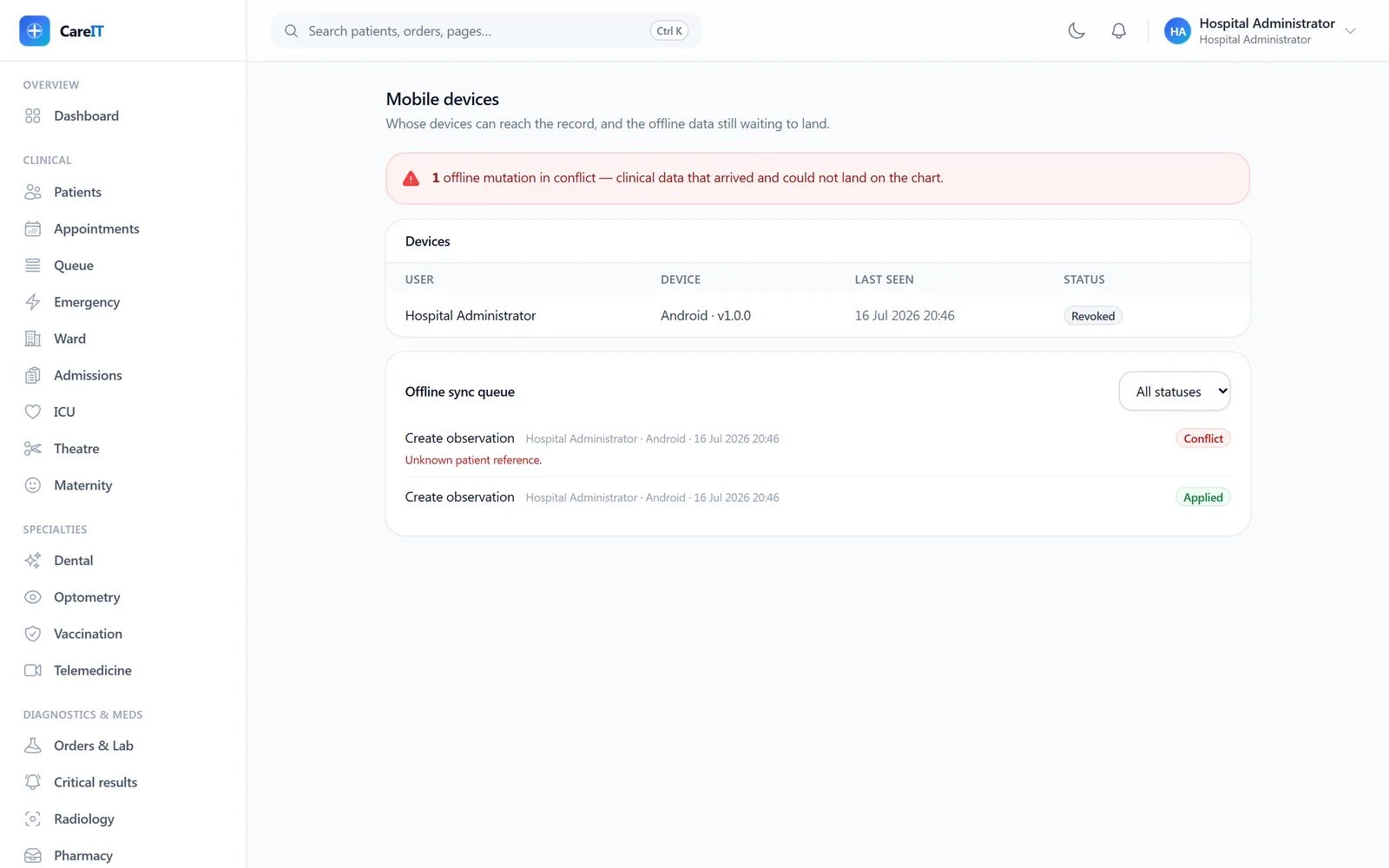
Device admin with the offline sync queue showing a conflict and its reason

Mobile devices & offline sync

/mobile-devices

Registered mobile devices and the offline sync queue. Vitals captured offline apply through the same interpreter as bedside entry; anything that can’t apply surfaces as a conflict with its reason — accepted-and-dropped doesn’t exist here.

  • Device list with revoke (admins see all, staff see their own)
  • Offline mutations honestly staged: pending → applied or conflict
  • Sync-down of the practitioner’s own appointments with watermark cursors
  • Idempotent submission — a retried upload never applies twice

07 · Billing & finance

Billing & finance

Charges are facts; invoices are presentations. Every screen downstream of that principle.

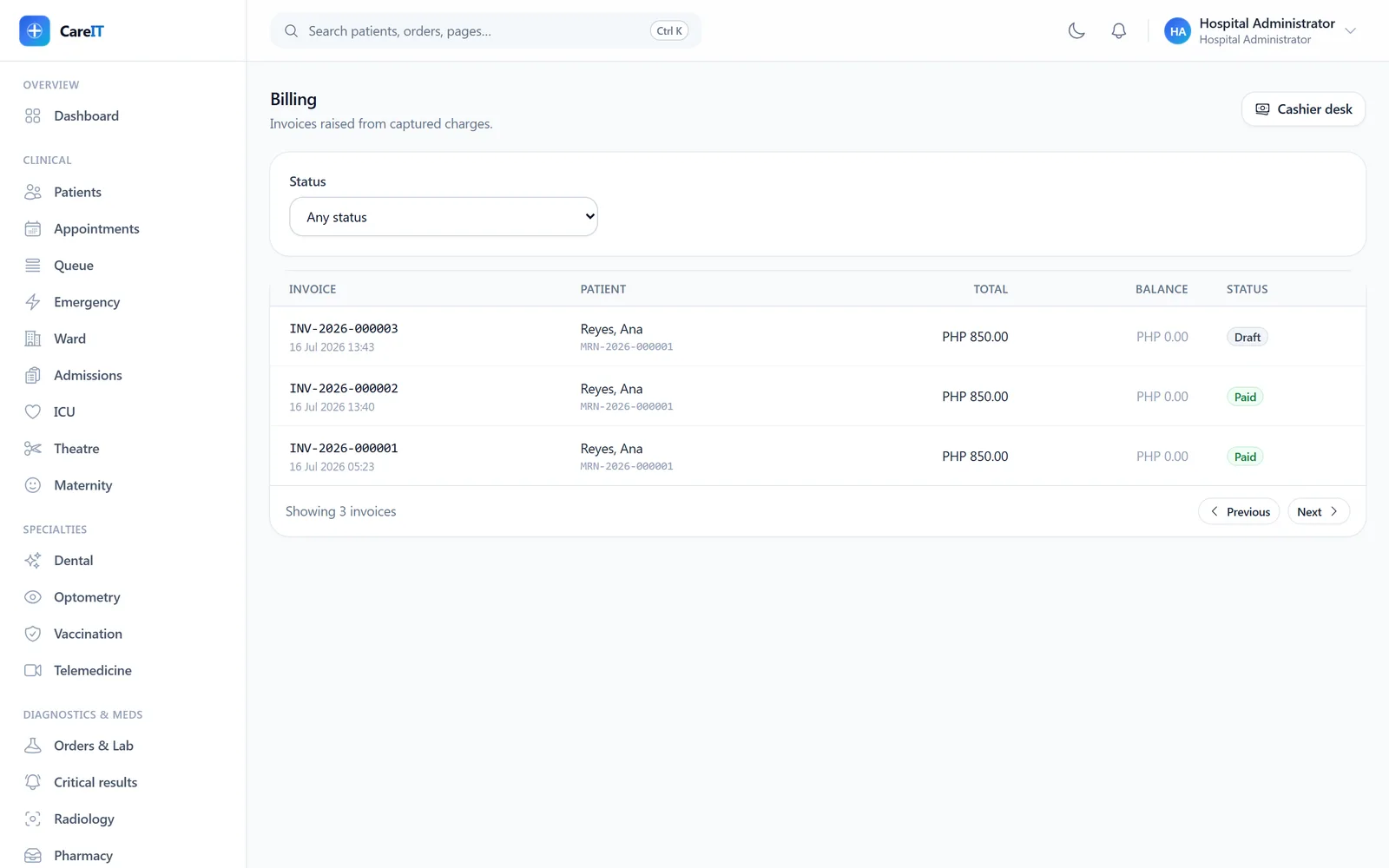
Invoice list with paid and draft invoices and balances

Invoices

/invoices

All invoices with their real states. Every invoice is raised from charges captured at the point of care — a draft owes nothing until finalized, and its balance says so.

  • Status filter across draft, finalized, paid, void
  • Balances computed from posted payments, not hand-arithmetic
  • One click into the cashier desk
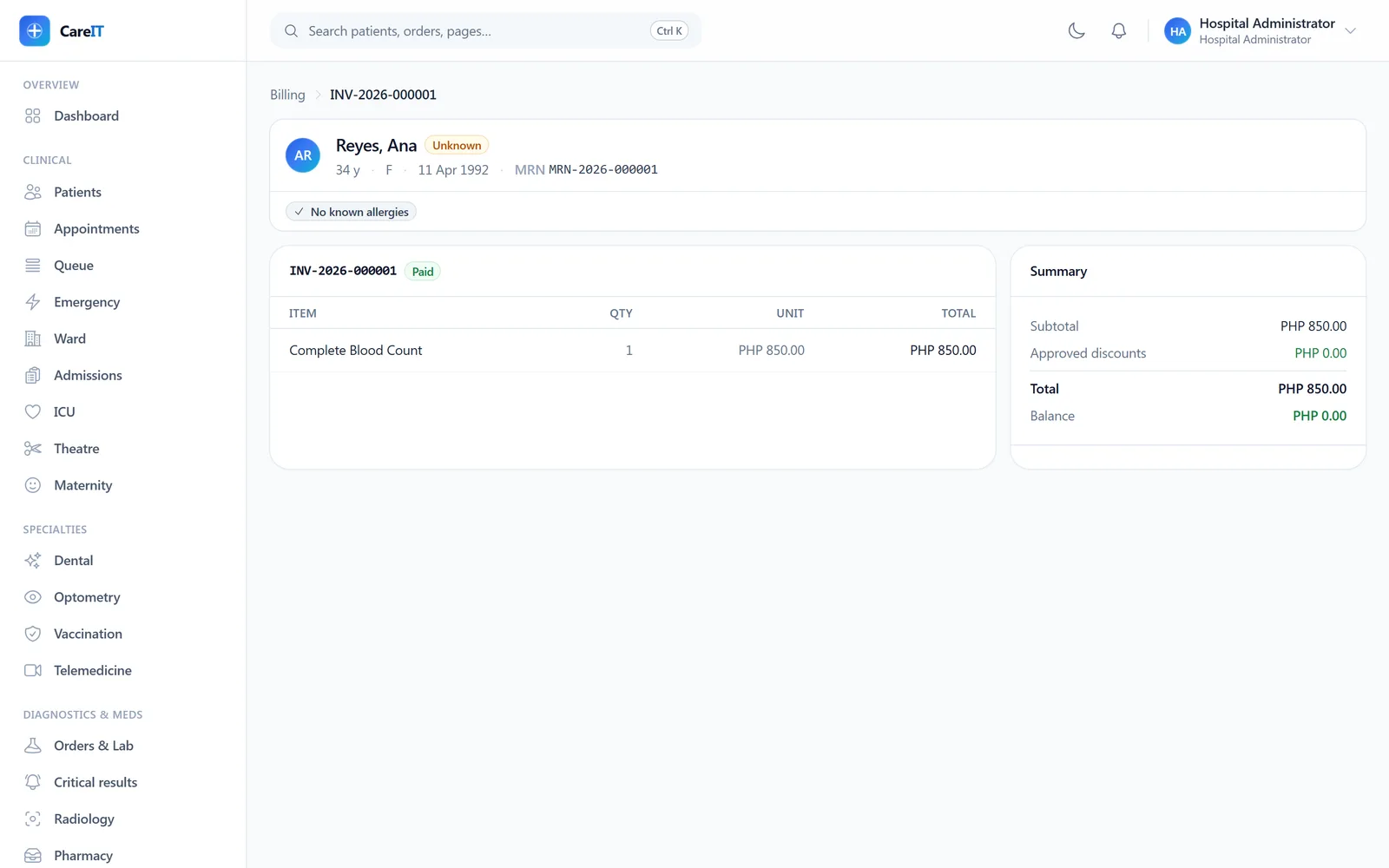
Paid invoice with line items, totals, and payment summary

Invoice detail

/invoices/{invoice}

One invoice, fully accounted: lines traced to captured charges, discounts with their approval trail, totals, and payments. Discounts enforce separation of duties — the requester can never be the approver.

  • Line items linked to the charges behind them
  • Discount request → second-person approval → applied, all on record
  • Finalize and void as explicit, audited transitions
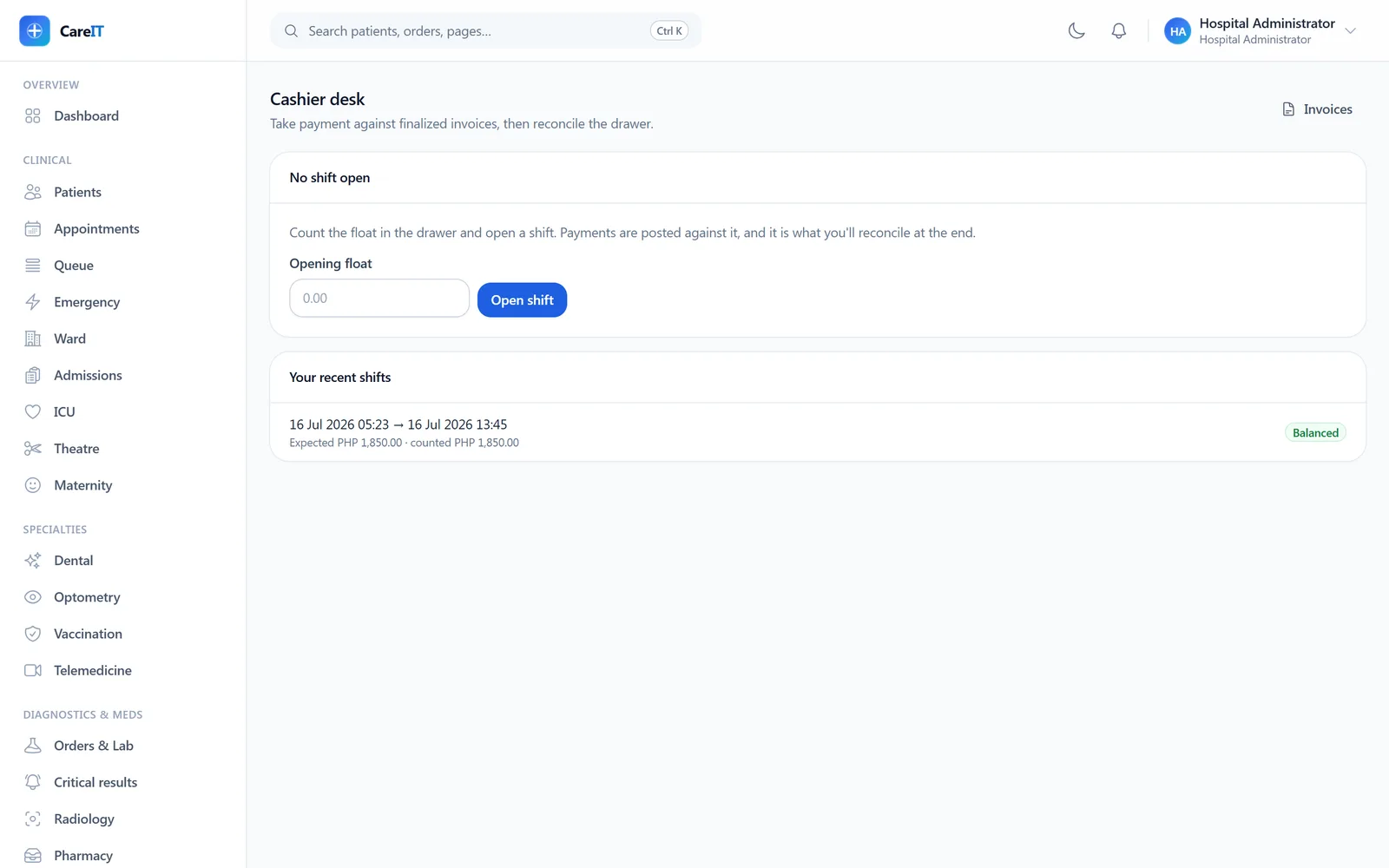
Cashier desk with shift opening and recent shift history

Cashier desk

/cashier

Shift-based cash management. Open a shift with a float, post payments against invoices, and reconcile at close — counted cash against cash takings only. Card and e-wallet takings are reported separately, so a variance actually means something.

  • Shift open/close with float and counted totals
  • Cash-only drawer reconciliation — the honest kind
  • Takings by method reported per shift
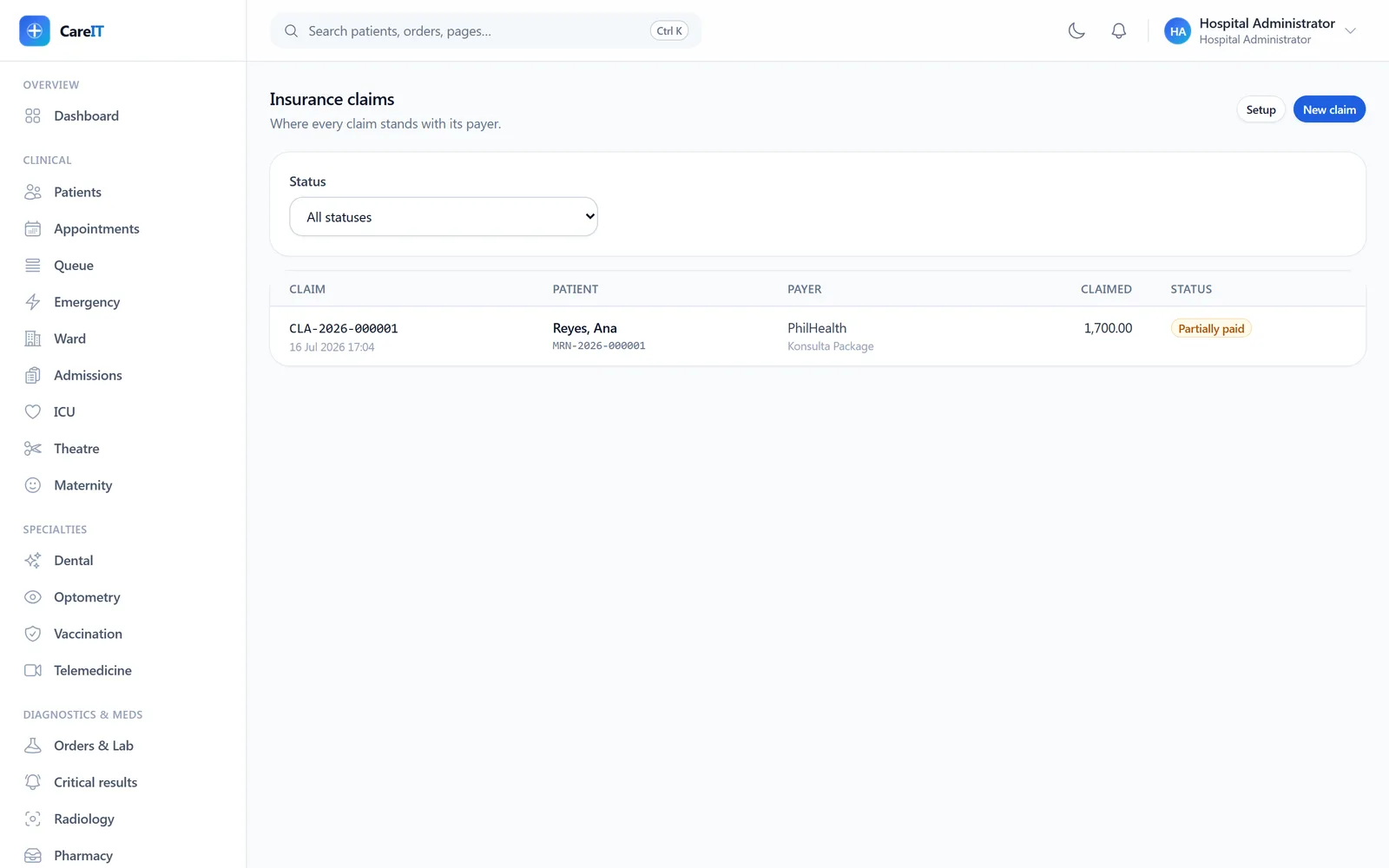
Claims worklist with a partially-paid claim and amounts

Insurance claims

/claims

Payer claims built from real charges: pick the policy, pick the claimable charges, validate, submit, and adjudicate line by line. A charge already on one claim can never be billed to a payer twice.

  • Payers, plans, and patient policies managed in-product
  • Member numbers encrypted, rendered masked (last four)
  • Adjudication outcomes computed from the approved amounts, never client-chosen
  • Full status-event history per claim
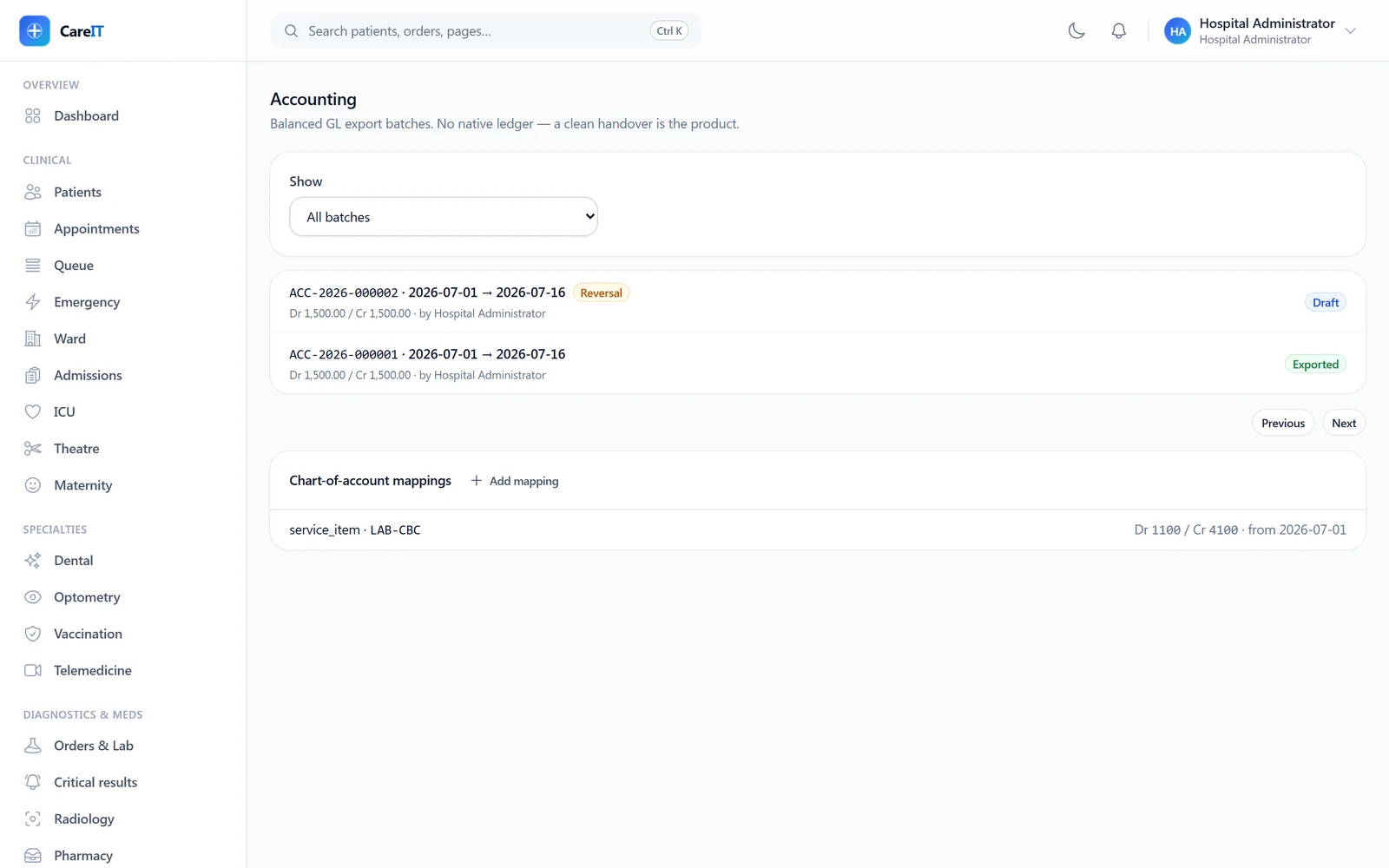
Accounting export batches with statuses and account mappings

Accounting exports

/accounting

Balanced journal batches exported to your general ledger, with two-person approval, transmission tracking, and acknowledgements. Exported batches are immutable — corrections happen as reversal batches, debits and credits swapped.

  • Draft → approved → transmitted → exported, with failure retry
  • One reversal per exported batch, drafted into normal approval
  • Account mappings maintained per source with effective dates

08 · Operations

Operations

Stock, people, numbers, and the health of the system itself.

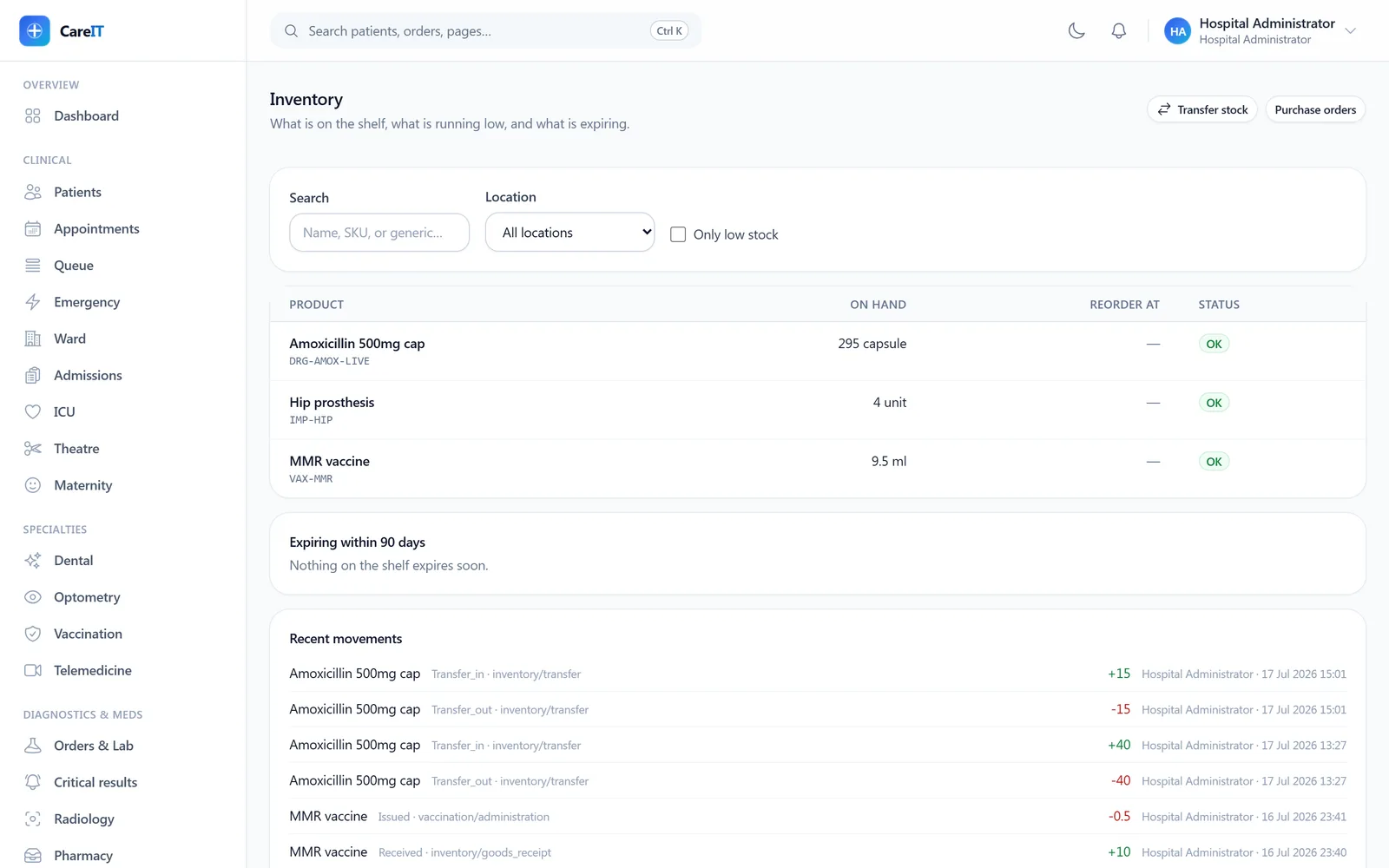
Stock board with on-hand quantities, expiring panel, and movement ledger

Inventory

/inventory

What is on the shelf, what is running low, and what is expiring — computed with the same availability rules dispensing uses, so the board and the dispenser can never disagree.

  • On-hand per product and location, lot-level
  • Low-stock worklist against reorder levels; expiring panel includes already-expired shelf stock
  • Readable movement ledger — receipts, issues, transfers, adjustments
  • Adjustments require a reason and land on the ledger; a matching count is not a movement
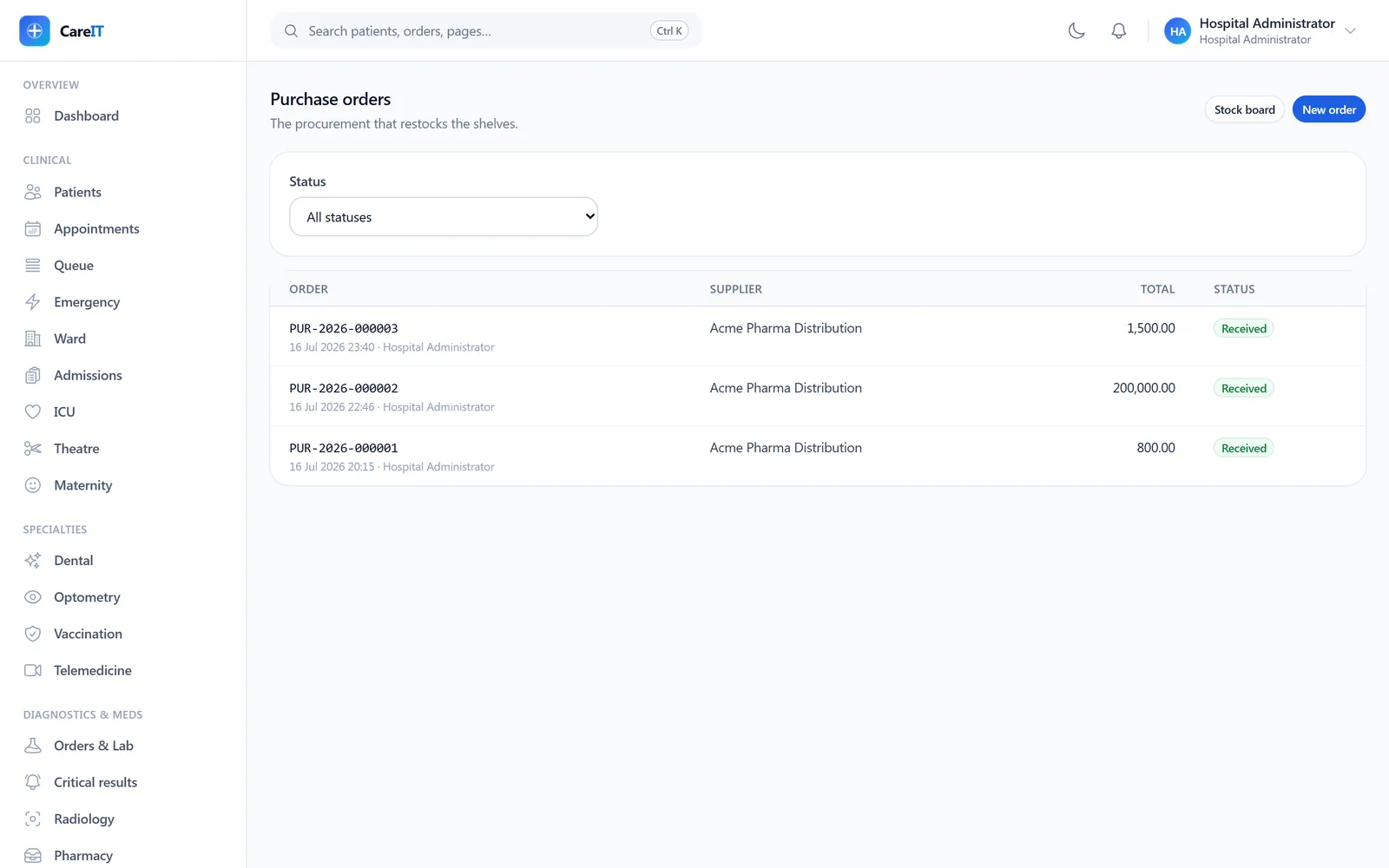
Purchase order list with suppliers, totals, and statuses

Purchase orders

/inventory/purchase-orders

Procurement with a paper trail: suppliers, purchase orders with line items, two-person approval (the raiser cannot approve), and receiving that demands lot and expiry per line.

  • Approval hidden from the raiser, with an explanation
  • Receive lines keyed by product with quantities defaulted to outstanding
  • Partial versus full receipt decided by the server, not the client
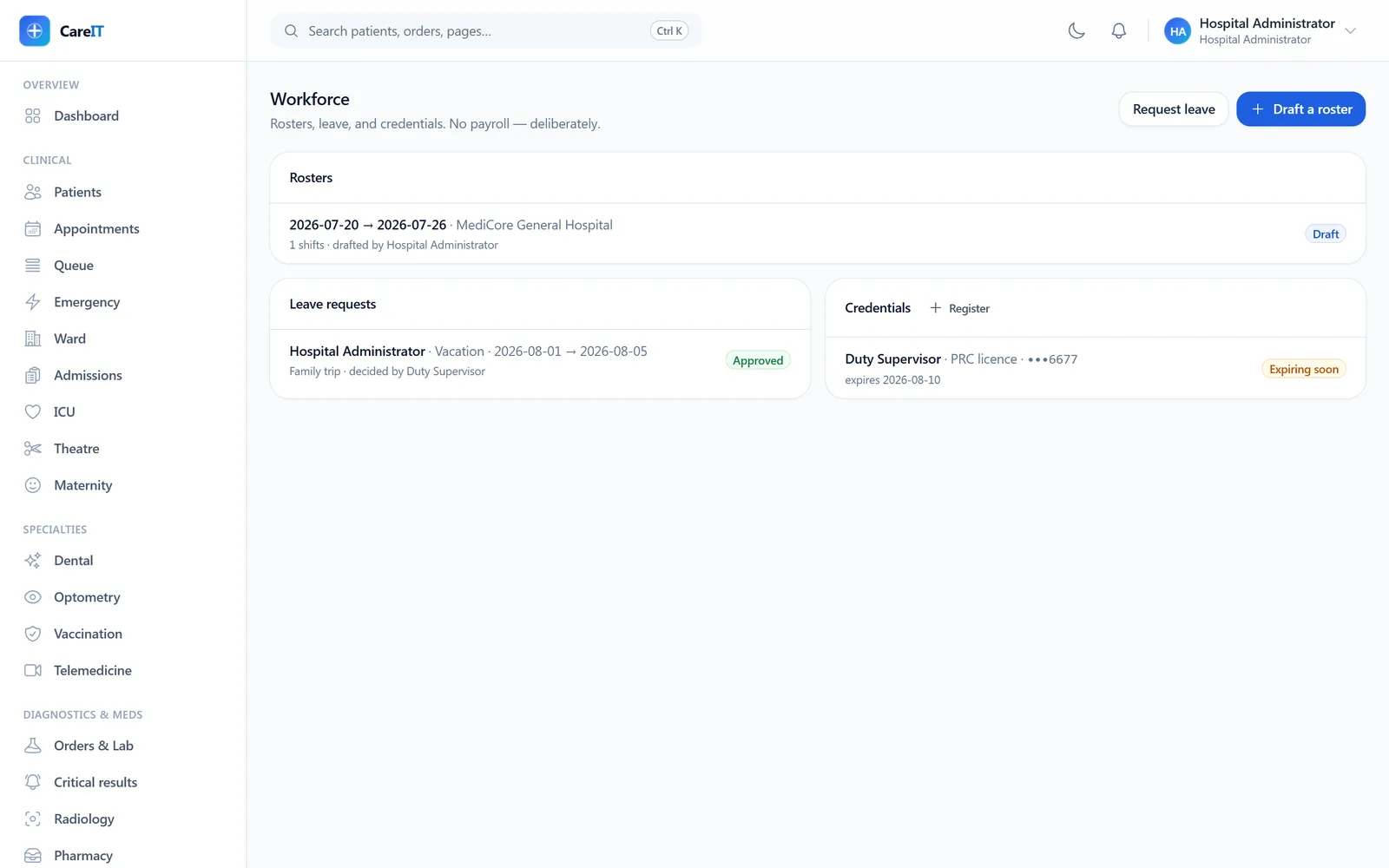
Workforce board with a roster draft, leave queue, and credential expiry tracking

Workforce

/workforce

Rosters, leave, attendance, and credentials in one board. Publishing a roster runs the minimum-staffing gate — a ward that would fall below its nurse floor refuses to publish, out loud.

  • Roster drafts with night shifts rolling past midnight correctly
  • Leave requests with overlap refusal; self-approval is forbidden
  • Licence numbers encrypted and masked, with expiry warnings at 90 days
  • Attendance corrections keep the original visible
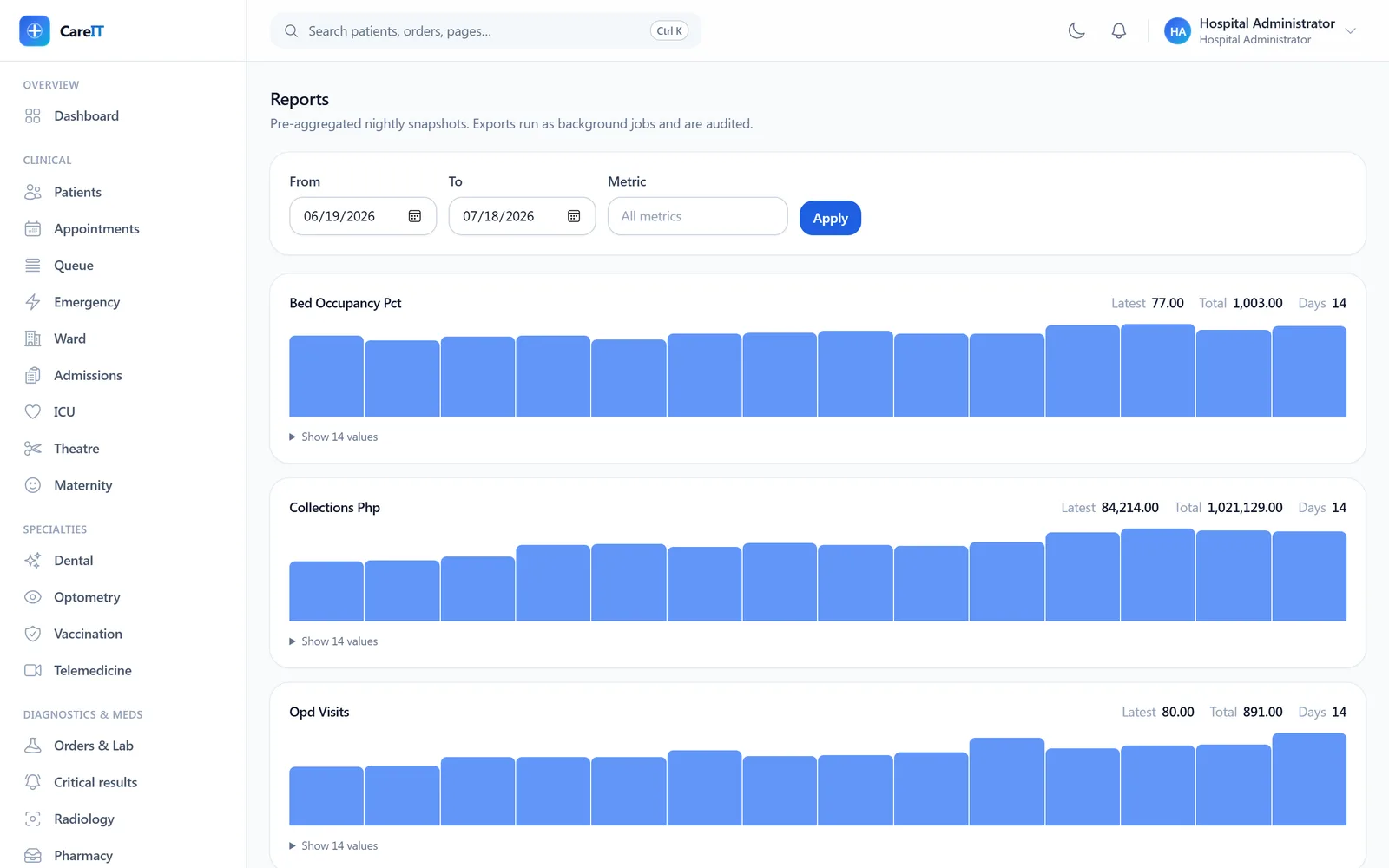
Reports page with per-metric snapshot series and export panel

Reports

/reports

Pre-aggregated nightly snapshots charted per metric — visits, collections, occupancy — plus queued exports that run in the background and deliver through expiring signed links.

  • Per-metric series over any date range
  • CSV exports queued, polled, and downloaded via signed links
  • Every export is recorded in the audit trail
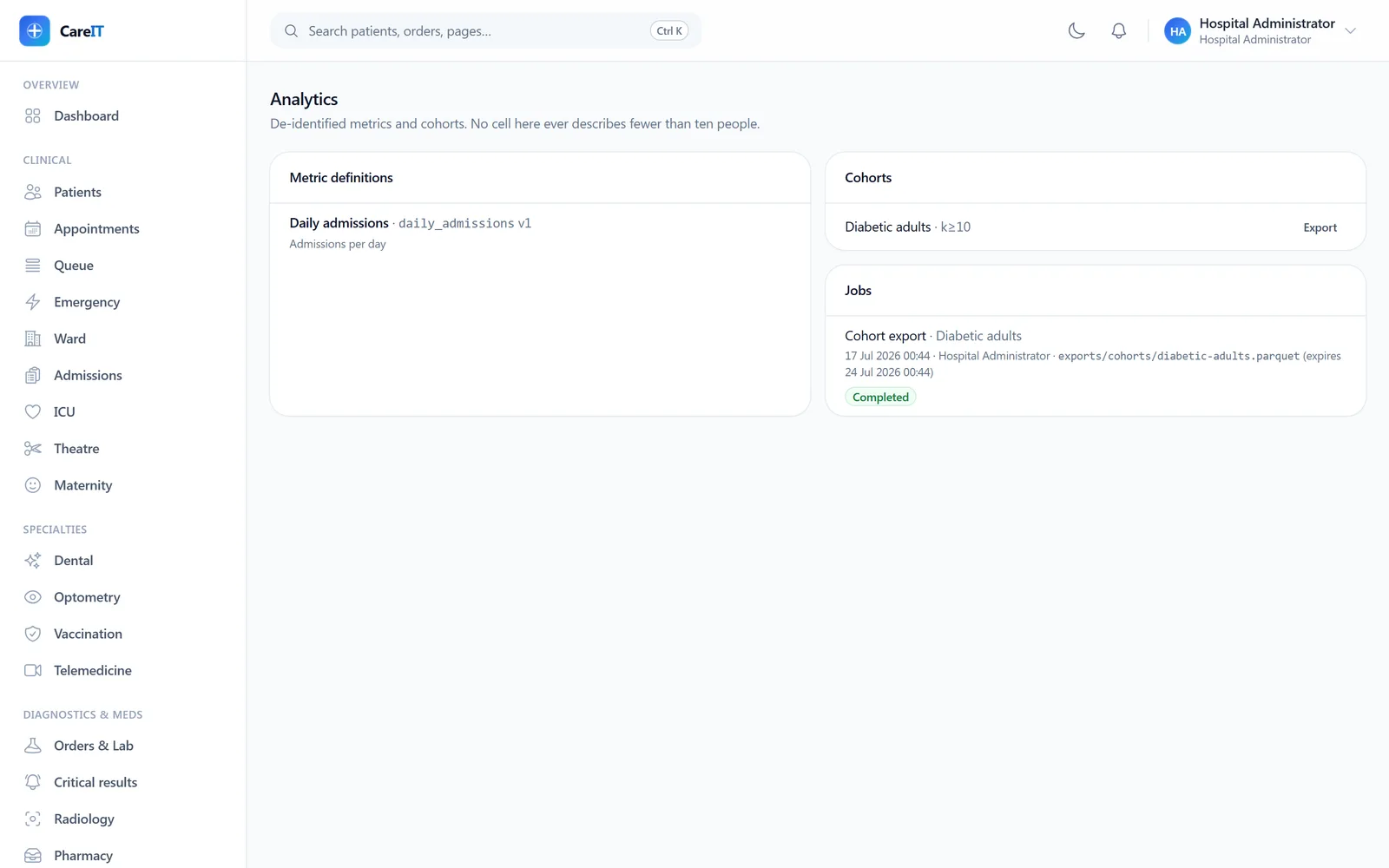
Analytics hub with metric definitions, cohorts, and job queue

Analytics

/analytics

The analytics hub: versioned metric definitions, patient cohorts, and an async job queue. Cohorts enforce a k-anonymity floor at definition time — small groups can’t leak into a spreadsheet.

  • Cohort definitions refuse k below 10
  • Snapshot generation honors the same anonymity guard
  • Exports gated by a dedicated permission, with expiring outputs
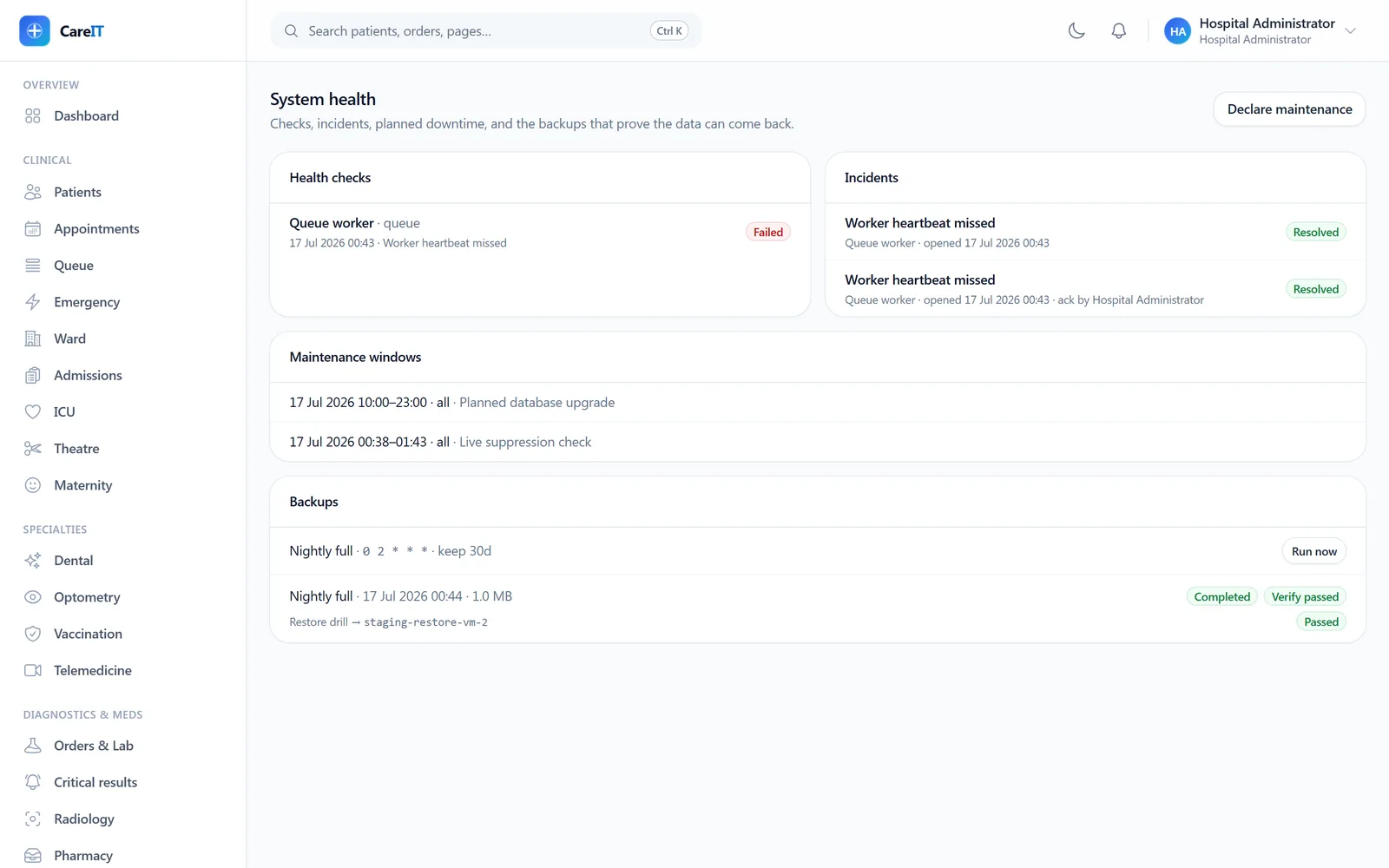
System health board with checks, incidents, maintenance windows, and backup runs

System health & backups

/system-health

Operational health for administrators: checks with latest samples, incidents with acknowledgement, maintenance windows (planned downtime pages nobody), and backup runs with restore tests that require evidence.

  • Failures inside a declared window never open incidents
  • Double-acknowledgement refused — ownership is single and explicit
  • An unverified restore is a hope, not a backup — outcomes recorded with evidence

09 · Settings & governance

Settings & governance

Licensing, the audit trail, and account security — the screens your IT director will ask for first.

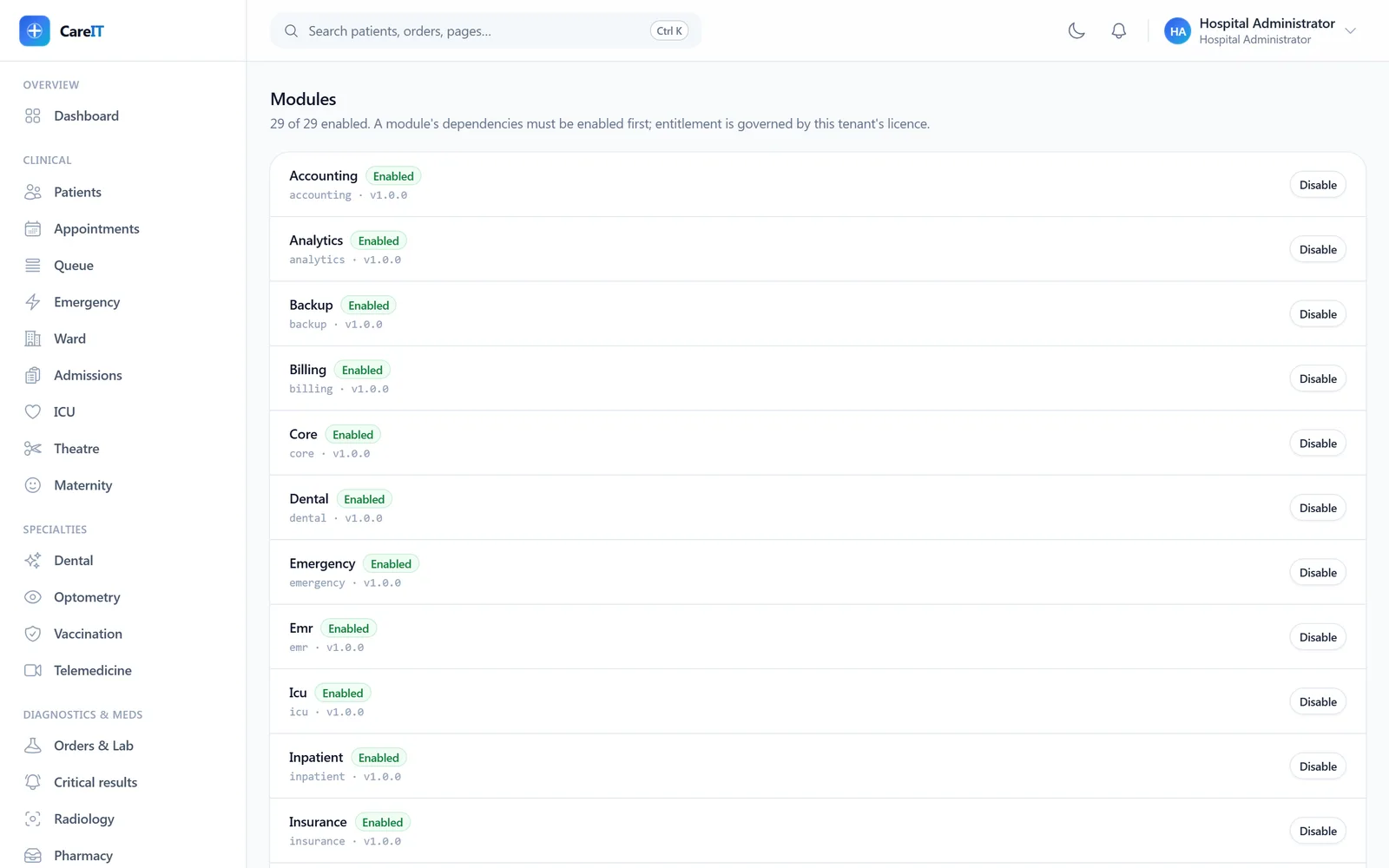
Module registry with tier badges and enable toggles per module

Modules & licensing

/settings/modules

The module registry — all 29 modules with their tiers and dependencies. Toggles double as licensing: enable what your facility licenses, and the registry refuses combinations whose dependencies are off, verbatim.

  • Tier-1 core enabled by default; Tier-2/3 switch on per license
  • Dependency checking with honest refusal messages
  • The same mechanism that phases your rollout
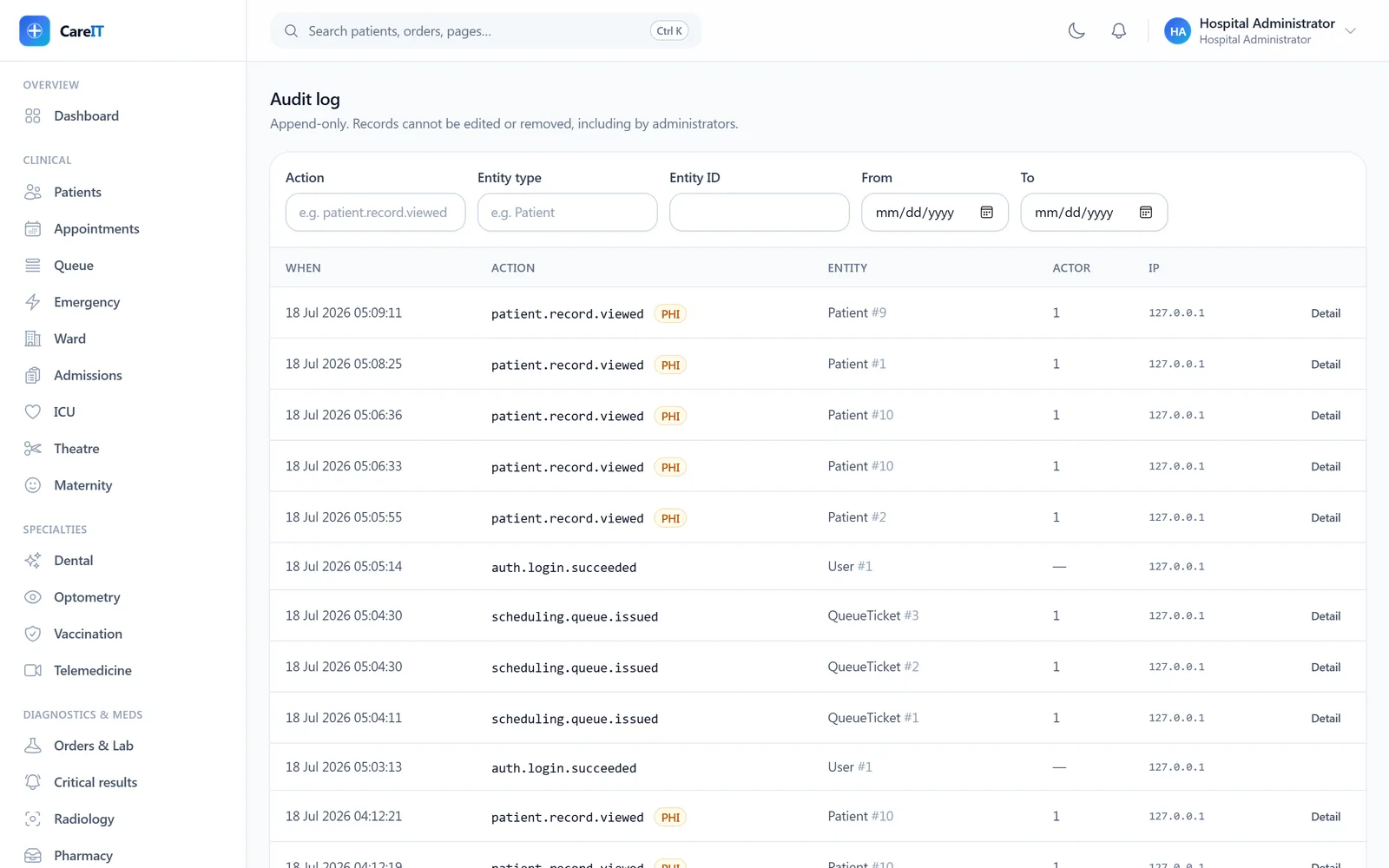
Append-only audit log with PHI tags, actors, IPs, and filters

Audit log

/settings/audit

The hash-chained, append-only audit trail: privileged actions and PHI reads with actor, entity, IP, and before/after diffs. PHI-touching entries are tagged. This is the screen that answers “who saw what, when”.

  • Tamper-evident hash chain across entries
  • Filters by actor, entity, action, and date
  • Expandable before/after diffs per entry
  • Portal logins and break-glass access included
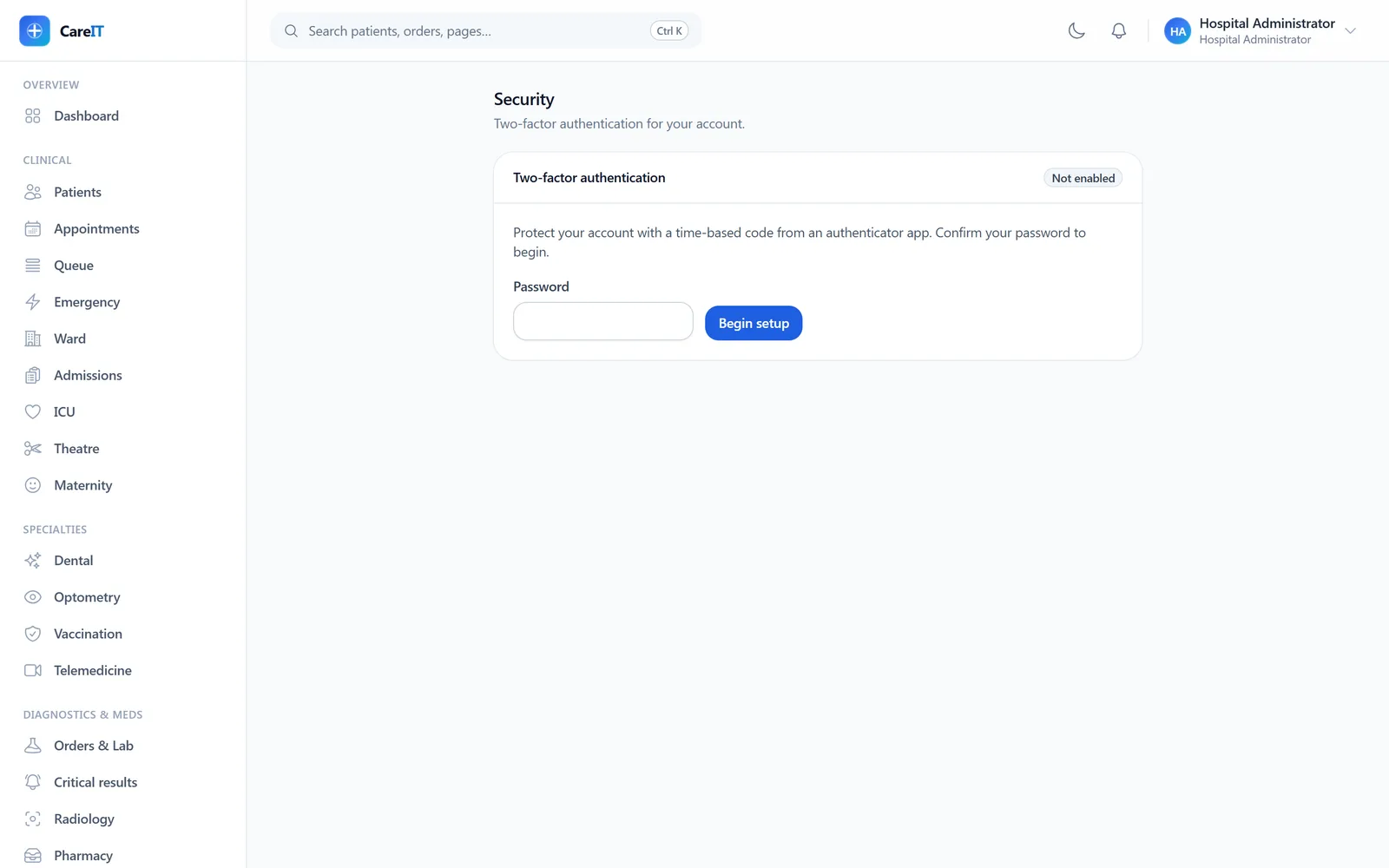
Two-factor authentication enrollment screen

Account security

/settings/security

Per-account security: enroll an authenticator app (TOTP), receive one-time recovery codes shown exactly once, and disable only with re-authentication.

  • TOTP enrollment with QR + manual secret
  • Recovery codes displayed once, then hashed
  • Password changes require the current password and revoke other sessions

Seen every screen. Now drive them.

A live walkthrough beats screenshots — we’ll run your facility’s journey through the real system.